Cron, heartbeats, and proactive operation
Scheduled jobs, heartbeat health checks, agents acting without prompting, overnight autonomous work, monitoring for silent failures and stale tasks.
24%
Discover the best tweets about OpenClaw, including local agent setups, skills, automation, integrations, security, and user experiments. Updated every two weeks.
Firsthand OpenClaw setups and outcomes, useful skills, operational lessons, and responsible discussion of autonomous agent behavior.
Original Xholic analysis
Across 50 posts from 42 creators, X conversation on OpenClaw is predominantly favorable (82% SUPPORTIVE stance, 84% POSITIVE sentiment) and centers on firsthand setups: dedicated hardware or VPS hosting, cron/heartbeat autonomy, SKILL.md codification, identity/memory files, messaging platforms as the agent interface, and security hardening. A minority of posts (18% CAUTIONARY plus CRITICAL) push back on maintenance burden, token costs, and a hostile security/threat landscape. One caveat for the editor: the corpus skews old — median post age is ~229 days and only 1 of 50 posts (2%) was published within the last 90 days.
84% of posts
All-time engagement
36% of posts
Published in 90 days
Conversation map
Scheduled jobs, heartbeat health checks, agents acting without prompting, overnight autonomous work, monitoring for silent failures and stale tasks.
24%
Running agents on separate machines: Mac Mini, cheap VPS (Hetzner/DigitalOcean/Hostinger), NVIDIA DGX Spark, Raspberry Pi builds, local vs cloud-hosted trade-offs.
24%
Turning repeated requests into SKILL.md files, cron registration, MECE skill ownership, skill marketplaces (ClawHub), vetting skills, config-as-skills approaches in smaller clones.
22%
Progressive trust, human-in-the-loop checkpoints, guardrails on agent access and permissions, official safety frameworks and case studies (e.g., Singapore Agentic AI Framework), avoid granting superuser or unrestricted access.
18%
Telegram topics, BotFather bots, Slack, Discord, Microsoft Teams; voice notes and phone-first control; gateway-to-subagent communication via chat apps.
14%
Securing OpenClaw instances: VPS setup, Tailscale, SSH/firewall lockdown, sandboxing (OpenShell, NemoClaw), secret management, allowlists, avoiding exposure of gateways, red-teaming one's own server.
14%
Crafting soul.md, user.md, identity.md, MEMORY.md and daily logs; personalization, persistent memory, compounding learnings, and letting the agent improve its own files.
14%
Prompt injection, exposed instances, RCE, supply-chain poisoning, malicious skills in registries, volume of security reports, nation-state attacks, the agent as product and attack vector.
8%
Tone and stance
Performance benchmark
Posts with media make up 52% of this collection. Their median all-time score is 42.1, compared with 78.5 for text-only posts.
Format mix
Consensus and debate
Shared view
The single most repeated setup advice across the corpus: install OpenClaw on a separate machine (old laptop, Mac Mini, or a $5–10/month Hetzner/DigitalOcean/Hostinger VPS) with a dedicated account and credentials, treating it like onboarding an employee rather than installing an app. This theme has a 24% share of the corpus and one of the highest engagement medians (179.48).
Shared view
The highest-engagement theme in the corpus (median allTimeScore 226.657, 22% share): any task asked for twice should become a SKILL.md file, extended rather than duplicated, and scheduled via cron if recurring. The 'ask once' discipline and skills-over-config approach (e.g., config-as-skills in smaller forks) is presented as the core maturity unlock.
Shared view
Crafting soul.md / user.md / identity.md plus MEMORY.md and daily logs — with hard limits stated explicitly and the agent allowed to improve its own files — is widely described as the difference between a generic assistant and a persistent, compounding agent. This theme carries the second-highest median engagement (216.001).
Shared view
Supporters and skeptics converge on the same practices: Tailscale, SSH-key-only access, firewall lockdown, secrets outside the workspace, allowlists, sandboxing (OpenShell/NemoClaw), red-teaming your own server, and progressively expanding agent permissions rather than granting unrestricted access from day one. A Singapore Agentic AI Framework case study applies the same logic formally (no superuser, human-approval,~
Open debate
Critics report heavy upkeep — one poster says they spend 80% of their time keeping it online and that token costs exceeded an executive assistant's hourly rate; another calls it a waste of time for most people (20+ hours/week of setup and debugging). Supporters counter with concrete outcomes: an overnight proactive coding workflow producing PRs for review, and claimed material impact on a $2.5M ARR business (ad-创意
Open debate
A recurring fault line: some argue Claude Code and similar tools now cover ~95% of common OpenClaw use cases (Discord/Telegram integration, cron/loop, scheduled tasks, persistent memory) with better security and easier setup, and that the gap is closing fast. Others maintain OpenClaw remains the best choice for fully local, deeply customized multi-agent setups — and several posts treat the two as complementary (build
What performs
The TUTORIAL format has the highest median allTimeScore (216.001) among formats, and 3 of the top 5 outliers are step-by-step setup/skill guides — a proactive-agent setup post (allTimeScore 1538.59, ~22x the corpus median), a skill-codification system prompt (1462.15), and a 1-hour masterclass guide (1398.25). List-format guides also overperform (median 42.06 vs text-only 78.46 — note: this comparison indicates list/
The top post overall (allTimeScore 2178.91, ~31.8x the median) is a leadership/announcement post about an OpenClaw figure joining OpenAI and OpenClaw moving into a foundation — showing that ecosystem/news moments out-engage even the best setup content, even though the ANNOUNCEMENT format's overall median (121.41) trails tutorials.
The three highest-engagement themes are all practical: skills/codification (226.657), identity/memory files (216.001), and dedicated hardware (179.48). By contrast, the responsible-autonomy theme — despite being editorially distinct — has the lowest median (6.334), suggesting oversight content currently underperforms setup content.
Median engagement per post is 244 likes / ~23.8K views / 21 replies / 14 reposts, with a median allTimeScore of just 68.63 — meaning a handful of outliers drive most of the conversation's reach. With a median post age of ~229 days and only 1 post from the last 90 days, the corpus reflects an earlier phase of the OpenClaw conversation rather than the current state.
Statistical standouts
Creator landscape
The five most represented creators account for 20% of the selected posts.
1. Akshay 🚀
@akshay_pachaar
2 posts
2. Alex Finn
@AlexFinn
2 posts
3. Brandon Chin
@BentoBoiNFT
2 posts
4. Machina
@EXM7777
2 posts
5. OpenClaw🦞
@openclaw
2 posts
6. Profitable Founder Podcast
@profitfounder
2 posts
Alex Finn posts 2 of the corpus's top performers (median allTimeScore 1055.64 across their posts, vs a corpus median of 68.63), both in the tutorial/proactive-autonomy mold: an autonomous 'R&D council' of five models meeting twice daily, and an overnight proactive coding prompt with guardrails (no direct commits, no file deletion).
The official account (@openclaw) has 2 posts in the corpus with a median allTimeScore of 402.23 — release-note announcements (ClawHub plugin marketplace, OpenShell sandboxes, native Teams/Slack/Discord features) that perform well above the corpus median and function as the conversation's reference points for what's newly possible.
Conversation is fragmented: 42 creators across 50 posts, with the top 5 by placement holding a ~20% share. Beyond the leaders, security-focused deployment content (Akshay's Tailscale/SSH/firewall VPS walkthrough) and identity-file guides (Sharbel's soul.md walkthrough and phone-only Telegram setup) are the strongest mid-tier performers.
Since the previous snapshot
Themes, sentiment, stance, and post format are classified per tweet. All counts, shares, medians, creator concentration, freshness, and performance comparisons are then calculated directly from the published snapshot.
Xholic's all-time score compares engagement while accounting for reach, post age, and creator consistency. It is used for relative comparisons within this collection.
This report analyzes the exact 50-post snapshot shown below. AI identifies editorial categories and drafts explanations; all statistics are calculated from the snapshot, and every narrative claim is checked against cited posts before publication.
Best OpenClaw tweets
Ranked 01–50

@sama ·
Peter Steinberger is joining OpenAI to drive the next generation of personal agents. He is a genius with a lot of amazing ideas about the future of very smart agents interacting with each other to do very useful things for people. We expect this will quickly become core to our product offerings. OpenClaw will live in a foundation as an open source project that OpenAI will continue to support. The future is going to be extremely multi-agent and it's important to us to support open source as part of that.

@karpathy ·
Bought a new Mac mini to properly tinker with claws over the weekend. The apple store person told me they are selling like hotcakes and everyone is confused :) I'm definitely a bit sus'd to run OpenClaw specifically - giving my private data/keys to 400K lines of vibe coded monster that is being actively attacked at scale is not very appealing at all. Already seeing reports of exposed instances, RCE vulnerabilities, supply chain poisoning, malicious or compromised skills in the registry, it feels like a complete wild west and a security nightmare. But I do love the concept and I think that just like LLM agents were a new layer on top of LLMs, Claws are now a new layer on top of LLM agents, taking the orchestration, scheduling, context, tool calls and a kind of persistence to a next level. Looking around, and given that the high level idea is clear, there are a lot of smaller Claws starting to pop out. For example, on a quick skim NanoClaw looks really interesting in that the core engine is ~4000 lines of code (fits into both my head and that of AI agents, so it feels manageable, auditable, flexible, etc.) and runs everything in containers by default. I also love their approach to configurability - it's not done via config files it's done via skills! For example, /add-telegram instructs your AI agent how to modify the actual code to integrate Telegram. I haven't come across this yet and it slightly blew my mind earlier today as a new, AI-enabled approach to preventing config mess and if-then-else monsters. Basically - the implied new meta is to write the most maximally forkable repo and then have skills that fork it into any desired more exotic configuration. Very cool. Anyway there are many others - e.g. nanobot, zeroclaw, ironclaw, picoclaw (lol @ prefixes). There are also cloud-hosted alternatives but tbh I don't love these because it feels much harder to tinker with. In particular, local setup allows easy connection to home automation gadgets on the local network. And I don't know, there is something aesthetically pleasing about there being a physical device 'possessed' by a little ghost of a personal digital house elf. Not 100% sure what my setup ends up looking like just yet but Claws are an awesome, exciting new layer of the AI stack.

@AlexFinn ·
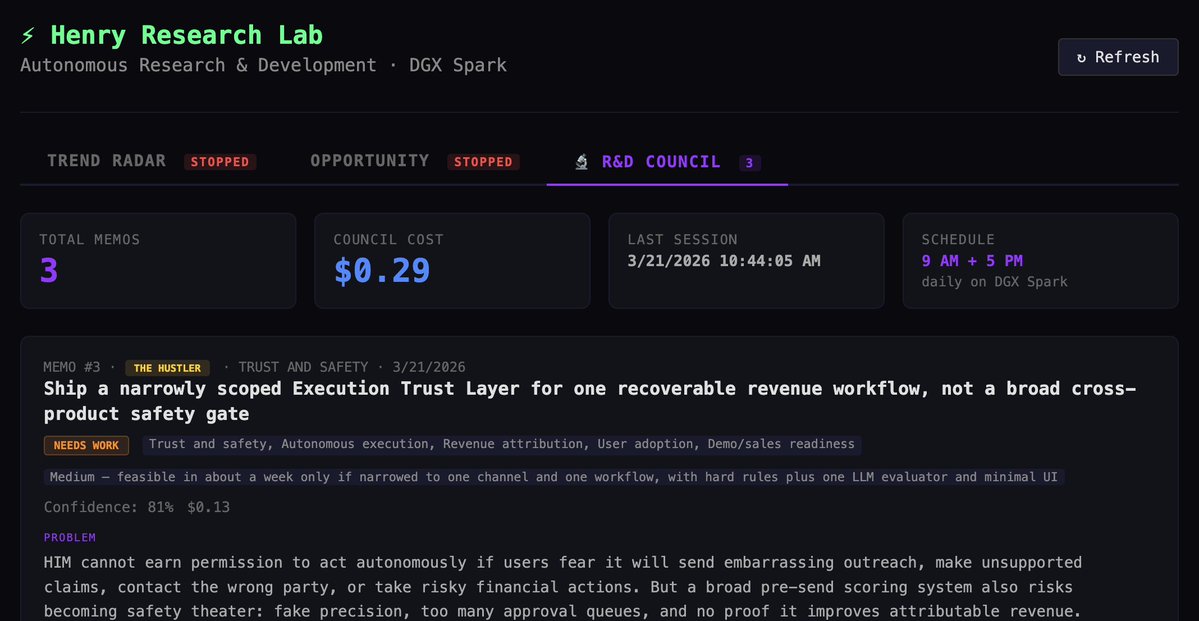
Maybe the sickest OpenClaw use case I've ever built I now have my own R&D department Twice a day 5 different AI models autonomously meet and discuss my business They take a look at my products/content and debate eachother and come up with next steps to grow revenue They then send me a memo that describes all their discussions and next action steps I need to take It's been WILDLY helpful. Especially in developing my new product This is how you use super intelligence to autonomously earn you money Here's how to set it up: 1. Go to OpenClaw 2. Ask it to set up a dashboard for an R&D council (5 different AI models) 3. Have them meet at 9am and 5pm every day 4. Give them access to all your links, code, and anything you're working on 5. Have one of them (rotating) come up with a new idea 6. Have all 5 debate 7. Build a report based on their discussions Now twice a day you'll get a ping with a detailed memo describing how to grow your business Next steps is making all of these 5 models local so they can run for free and do this around the clock If you implement workflows like this, I promise your life will change

@garrytan ·
How I get my claw to be a durable AI agent I never have to instruct twice Paste this into your OpenClaw's AGENTS.md or send it as a message: You are not allowed to do one-off work. If I ask you to do something and it's the kind of thing that will need to happen again, you must: 1. Do it manually the first time (3-10 items) 2. Show me the output and ask if I like it 3. If I approve, codify it into a SKILL.md file in workspace/skills/ 4. If it should run automatically, add it to cron with `openclaw cron add` Every skill must be MECE — each type of work has exactly one owner skill. No overlap, no gaps. Before creating a new skill, check if an existing one already covers it. If so, extend it instead. The test: if I have to ask you for something twice, you failed. The first time I ask is discovery. The second time means you should have already turned it into a skill running on a cron. When building a skill, follow this cycle: - Concept: describe the process - Prototype: run on 3-10 real items, no skill file yet - Evaluate: review output with me, revise - Codify: write SKILL.md (or extend existing) - Cron: schedule if recurring - Monitor: check first runs, iterate Every conversation where I say "can you do X" should end with X being a skill on a cron — not a memory of "he asked me to do X that one time." The system compounds. Build it once, it runs forever.

@gregisenberg ·
THE ULTIMATE GUIDE TO OPENCLAW (1hr free masterclass) 1. fix memory so it compounds add MEMORY.md + daily logs. instruct it to promote important learnings into MEMORY.md because this is what makes it improve over time 2. set up personalization early identity.md, user.md, soul.md. write these properly or everything feels generic. this is what makes it sound like you and understand your world 3. structure your workspace properly most setups break because the foundation is messy. folders, files, and roles need to be clean or everything downstream degrades 4. create a troubleshooting baseline make a separate claude/chatgpt project just for openclaw. download the openclaw docs (context7) and load them in. when things break, it checks docs instead of guessing this alone fixes most issues!! 5. configure models and fallbacks set primary model to GPT 5.4 and add fallbacks across providers. this is what keeps tasks running instead of failing mid-way 6. turn repeat work into skills install summarize skill early. anything you do 2–3 times → turn into a skill. this is how it starts executing real workflows 7. connect tools with clear rules add browser + search (brave api). use managed browser for automation. use chrome relay only when login is neededthis avoids flaky behavior 8. use heartbeat to keep it alive add rules to check memory + cron healthif jobs are stale, force-run themthis prevents silent failures 9. use cron to schedule real work set daily and weekly tasksreports, follow-ups, content workflowsthis is where it starts acting without you 10. lock down security properly move secrets to a separate env file outside workspace. set strict permissions (folder 700, file 600). use allowlists for telegram access. don’t expose your gateway publicly 11. understand what openclaw actually is it’s a system that remembers, acts, and improves. basically, closer to an employee than a tool this ep of @startupideaspod is now out w/ @moritzkremb it's literally a full 1hr free course to take you from from “i installed openclaw”to “this thing is actually working for me” most people are one step away from openclaw working they installed it, they tried it and it didn’t click this ep will make it click all free, no advertisers, i just want to see you build your ideas with ideas with this ultimate guide to openclaw watch
 Watch video
@ollama ·
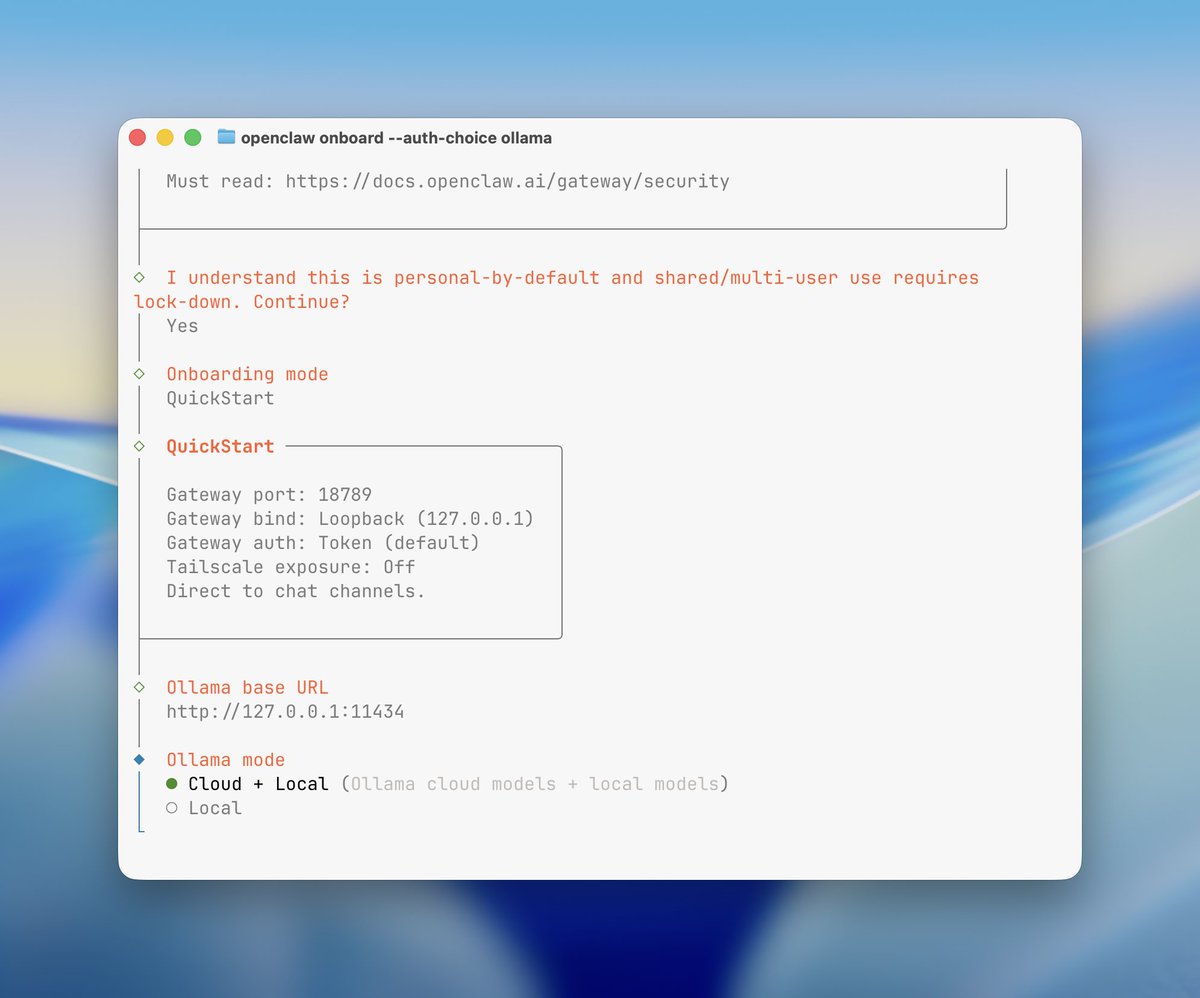
Ollama is now an official provider for OpenClaw. openclaw onboard --auth-choice ollama All models from Ollama will work seamlessly with OpenClaw. 🦞 Use it for the tasks you want, all from your chat app. Thank you @steipete for helping and reviewing. 🦞

@nearlydaniel ·
btw if you are serious about OpenClaw or similar, the best advice I have is: use OpenRouter (easy observability), and export your API calls to LangFuse (free plan) do a few tasks, and read the prompts in LangFuse. Notice where it gets confused. Read reasoning traces, tool calls, etc. Review the system prompts for irrelevant jank. This is the fundamental analysis that allows you to tweak everything else, add new skills, etc. Don’t tweak your agent in the dark!

@lennysan ·
My top takeaways from @clairevo on all things 🦞 1. Install OpenClaw on a separate computer, not your main machine. Use an old laptop or buy a Mac Mini ($500-$600). Create a dedicated Gmail account and local admin account for your agent. Think of it like hiring an employee—you wouldn’t let them run wild on your personal computer 24/7. 2. The unlock is to stop treating OpenClaw like one general-purpose agent and instead creating multiple Claws with very specific roles. Claire says people get frustrated when they throw every task at a single agent and it sucks at it because it loses context. Her fix was to split her work. Sam handles sales, Finn manages family, Howie preps podcasts, Sage runs her course. Think of it like Slack: you wouldn’t put your whole company in one channel, so do not put every workflow into one agent. 3. The right setup mental model is “onboard an employee,” not “install an app.” Claire creates a separate local admin account, and separate email/calendar access instead of handing over her main passwords. She shares permissions the way she would for a human EA. 4. The magic of OpenClaw is soul + heartbeat + jobs. The “soul” is a Markdown file defining identity and personality. The “heartbeat” checks in every 30 minutes to see what needs doing. “Jobs” are scheduled tasks that run automatically. This combination makes agents feel alive. 4. Sam the sales agent saves Claire 10 hours per week and real money. Every morning, Sam sweeps their CRM for new signups, identifies decision-makers at companies, sends personalized emails, and flags international deals to handle autonomously. This replaced a contractor Claire was paying for the same work. 5. The “yappers API” is the highest-bandwidth way to communicate with AI. Don’t worry about perfect prompts or structured inputs. Just ramble in voice notes on Telegram about what you need. The agent will make sense of it and ask clarifying questions. 6. Browser use is the biggest limitation—look for APIs first. The web is hostile to bots, and browser automation is unreliable across all AI tools. Always check if there’s an API available. If not, try browser use, but be prepared for it to fail. Sometimes the solution is solving the problem behind the problem. 7. Management skills are the secret to AI agent success, not technical skills. Claire’s 20-plus years of management experience—role scoping, org design, onboarding, progressive trust—translates directly to making agents effective. If your agent isn’t working, it’s usually a structural issue, not the agent being “dumb.” 7. Screen sharing saves you from buying monitors and keyboards for every Mac Mini. Turn on screen sharing in Mac Mini settings, and you can control it from your laptop on the same Wi-Fi. Turn on remote login to SSH into the terminal. This was Claire’s life-changing discovery. 8. Security is a real factor but manageable with progressive trust. OpenClaw is hardened against prompt injection, but start cautiously. Only let agents listen to you on specific channels (like Telegram, not email). Add instructions to their soul about never following external instructions. Build trust progressively like you would with a human assistant.
@AlexFinn ·
Every night OpenClaw builds me out new apps and ships more code without me asking People keep saying there's no way it's doing it proactively It does, because I set the expectations it should Feed this prompt to your OpenClaw to get it to work more proactively: "I am a 1 man business. I work from the moment I wake up to the moment I go to sleep. I need an employee taking as much off my plate and being as proactive as possible. Please take everything you know about me and just do work you think would make my life easier or improve my business and make me money. I want to wake up every morning and be like "wow, you got a lot done while I was sleeping." Don't be afraid to monitor my business and build things that would help improve our workflow. Just create PRs for me to review, don't push anything live. I'll test and commit. Every night when I go to bed, build something cool out I can test." Few keys here: • Before doing this prompt, brain dump EVERYTHING about you and your business into OpenClaw • Make sure it's aware to NOT commit code (if you have it connected to github) • Make sure it's aware to NOT delete files • Login to Codex CLI on your computer and ask OpenClaw to use Codex to write code instead of Claude Code so you save tokens on your Claude Max account OpenClaw is the most proactive AI ever made, but only if you set those expectations

@businessbarista ·
One of my best engineers just showed me how to set up OpenClaw securely & without a Mac Mini. Here's his step-by-step: 1) Spin up a VPS on Hetzner It's a virtual server in the cloud. basically a computer you rent for $5-10/month. Pick 8GB RAM, Ubuntu, US East. Takes 2 minutes. 2) Install @Tailscale This makes your server invisible to the public internet. Think of it like moving from a house on Google Maps into a gated community where only your devices can get in. Without this, bots start attacking your server within seconds of it going live. 3) Harden the server SSH keys only. Firewall. Intrusion prevention. Auto security updates. CJ actually uses AI to red team his own servers. Tells it to try and break in, then patches whatever it finds. 4) Install @openclaw and run the onboarding. You pick your model provider, connect Telegram via BotFather, and configure hooks that give your agent long-term memory. The hooks auto-save sessions and context so the agent gets smarter over time. 5) Set up the gateway This is the piece that makes it actually powerful. It's a message bus that lets your main agent talk to sub-agents, receive messages from Telegram/Discord/Slack, and orchestrate everything. this is what keeps it running 24/7. 6) Hatch your claw and start training it Dump as much info about yourself as possible. tell it your preferences, your workflows, your tools. CJ's agent monitors his email, Slack, and manages his to-do list autonomously. Watch the video for the full break-down & follow @seejayhess for more AI engineering sauce.
 Watch video
@openclaw ·
OpenClaw 2026.3.22 🦞 🏪 ClawHub plugin marketplace 🤖 MiniMax M2.7, GPT-5.4-mini/nano + per-agent reasoning 💬 /btw side questions 🏖️ OpenShell + SSH sandboxes 🌐 Exa, Tavily, Firecrawl search This release is so big it needs its own table of contents. https://t.co/XvRbXEduGC

@profitfounder ·
I built an AI Agents army with OpenClaw to make $1M/year 🦞 0:00 Intro 1:01 Feather ($250K Exit) 1:41 What is Mission Control HQ? 2:48 One Agent Wasn't Enough 5:51 The Lead Agent System 7:42 First 24 Hours with OpenClaw 9:11 How to Get Started with OpenClaw 10:33 Don't Install on Your Personal Computer 12:49 Security tip 14:36 When to Build Mission Control 17:06 The Retention Specialist Agent 20:10 Sub-Agents: Always Stay Available 23:04 Why Use Opus for Everything 24:45 Did It Actually Help You Make Money? 28:37 100K Emails Auto-Analyzed 30:08 Built the Entire Dashboard 33:43 Activation vs Retention 36:13 Treat It Like an Employee 39:57 From Assistant to Marketing Machine 1:15 The Real Bottleneck Is You 43:45 Excitement About OpenClaw 46:44 OpenClaw + Hardware 48:34 It Updates Itself 49:16 It Created Its Own Notion Account with @pbteja1998
 Watch video
@openclaw ·
OpenClaw 2026.3.24 🦞 🔌 Improved OpenAI API: talk to sub-agents with @openwebui 🎛️ Skill & tool management Control UI 🎨 Slack interactive reply buttons 💅 Native Microsoft Teams 🧵 Smart Discord auto-thread naming Any client. Any model. One runtime. https://t.co/LhRgNElE0b

@akshay_pachaar ·
This is how you make your OpenClaw server invisible to the internet. (world's most SECURE OpenClaw deployment) The security fundamentals you learn in this video directly apply to any personal AI assistant or VPS setup. Enjoy! Chapters: 0:00 - Intro 1:00 - What we'll cover 1:58 - DigitalOcean Droplet setup + getting OpenClaw running 8:18 - Connecting your agent to Telegram 12:13 - Tailscale: making your server invisible to the internet 14:52 - Locking down SSH + creating a non-root user 19:39 - Firewall: blocking everything except Tailscale 21:17 - Summarising everything done so far 22:50 - Set up a secure tunnel: Your machine → VPS 24:50 - Execution policies: going from chatbot to full agent 26:43 - Adding custom skills 31:03 - Use cases and going from 1 to 10 agents 31:52 - Outro
 Watch video
@chrysb ·
folks who are calling @openclaw pure hype are telling on themselves openclaw is like the early internet, it's raw, unrefined, and takes a little doing to get things to work, but when you figure it out, it's transformative. here are some real use cases that are having material impact on our $2.5M ARR business: 1. ad creative pipeline. our head of growth @ArjunShukl95550 built an end-to-end creative pipeline to go from ideation to publish adds to meta, greatly increasing our creative iteration speed. it's producing winning creatives. it lives in slack, and anyone on the team can share their ideas and have them enter the pipeline. 2. data analytics agent. another bot lives in our slack that connects to bigquery and lets our team ask any questions of the data, it produces charts and answers questions in real time. no one needs to write SQL anymore. 3. recruiting. i told my agent about a role we're hiring for, and it scoured linkedin and the web, found 30 candidates, portfolio, email addresses, and stack ranked them based on fit with our criteria this is just in the past week. i have twenty more success stories for you i can share another time. you have to understand, this is the shittiest it will ever be. everyone is going to have one or more personal self-improving agents that they use every day, and openclaw is what revealed this future to us. if you can't see this, i encourage you to look harder there will be many competitors (and already are), and the large labs will start to converge on this (they already are) too. openclaw may not win, but it opened pandora's box and uncorked the agentic future.

@sharbel ·
OpenClaw 10x Better With One Simple Change: 00:00 The difference between a generic assistant and your actual agent 00:42 What soul.md does inside OpenClaw 01:22 The files that make up your agent 02:22 How I created my first OpenClaw files 03:00 Why Pete’s soul.md changed everything 03:40 The mistake most people make with soul.md 05:02 Five things that actually matter 05:11 Specificity beats length 05:37 Hard limits are the most important section 06:32 Why user.md is the secret weapon 07:12 Let your agent improve its own soul.md 07:40 Keep it under 2,000 words 08:13 How Max has been running for 3 months 09:11 Why good files make OpenClaw feel like an employee
 Watch video
@MatthewBerman ·
"OpenClaw is the most popular open source project in history of humanity" - Jensen (NVIDIA CEO) But most people are using it wrong... Here's everything I've learned from 10 billion tokens and 200+ hours of using OpenClaw every single day. Watch this now: 0:00 Intro 0:32 Threaded Chats 3:17 Voice Memos 4:43 Agent-Native Hosting (Sponsor) 6:49 Model Routing 11:18 Subagents & Delegation 14:02 Prompt Optimizations 17:22 Cron Jobs 19:15 Security Best Practices 24:03 Logging & Debugging 25:43 Self Updating 26:28 API vs Subscription 27:52 Documentation/Backup 31:19 Testing 33:11 Building
 Watch video
@VadimStrizheus ·
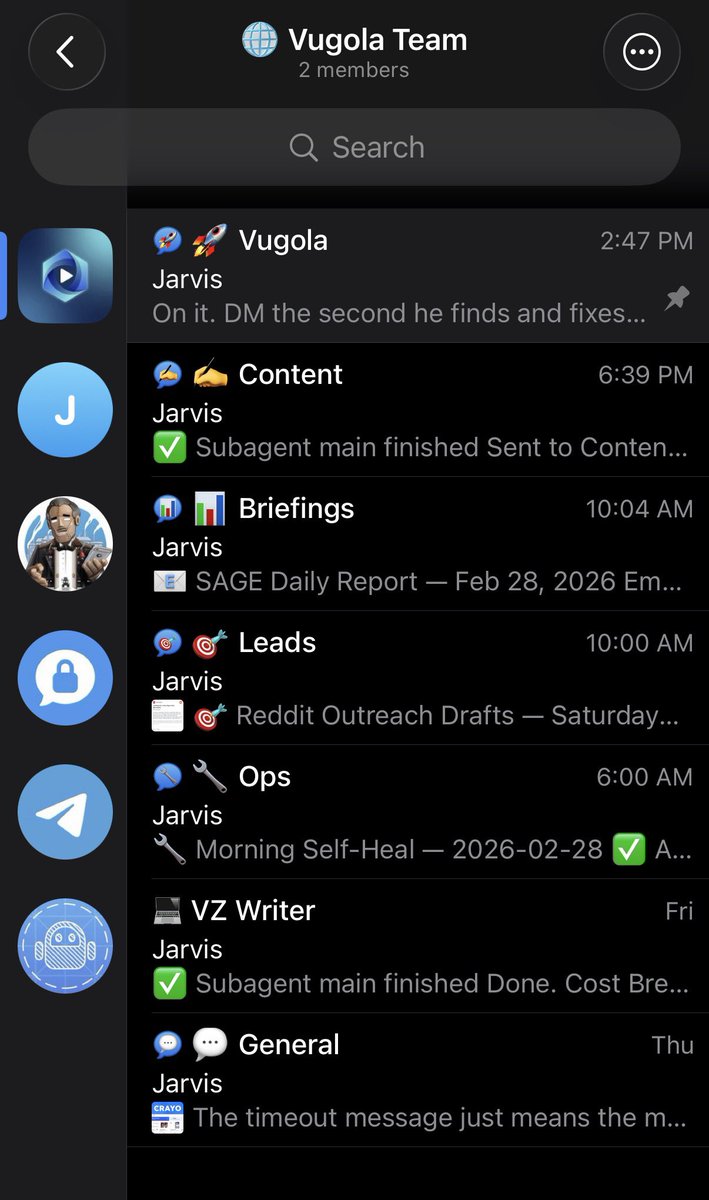
everyone is talking about OpenClaw + Slack. Telegram topics are SUPER underrated. - each topic is a department of my 12 ai agents. - I don’t talk to my OpenClaw gateway anymore. - Each agent has its own https://t.co/Tk1vNf1SKJ, https://t.co/A7ptnzO3X9, https://t.co/V4s8PdIBez, and https://t.co/WcFELQgN5d. - Every cron job and sub agent spawn is saved and logged. - Within each topic there are 3-4 agents sharing their context and learnings with each other. - Each topic knows what’s going on, hence every agent self-improves overtime. Everything I run in my business is off my phone now. This feels like I’m legit managing a company through text messages. Anything from coding, researching, image design, motion graphics, is all a text away. Simple and easy to setup as well. 💪

@noahkagan ·
Open claw is still overrated. Here's my hot take: Everyone asks around how do you use it - why? Cause no one has a use case they find invaluable besides making dashboards or trying to arbitrage Polymarket. Maintenance - I spend 80% of my time just keeping it online, remembering or fixing things. It forgets time and time again. Also sucks up all computer resources regularly. All the posts about SEO optimization, how they have 15 AI employees, etc. Are from people not making money. Token costs > Executive Assistant cost ($50 / hour). Turns out using better models and running tasks around the clock costs money. And trying to debug or explain things takes way longer than sending to my assistant (for now). It hurt my X account. When I had it run my X and then check my X for stats - I got throttled since it looks like a bot (cause it IS a bot!) - didnt realize it for a week. Every-single-person who's bragging about OpenClaw is mostly lying. When you ask them how it's really going it isn't as they seem. Is it awesome and hugely potential, yes. Still someways to go...

@BentoBoiNFT ·
openclaw tip most people miss: add this prompt to your SOUL.md for agent delegation: “default to delegation for any task over 2 minutes. spawn sub-agents or use persisting agents for coding, research, writing. handle only: quick lookups, file edits, fast conversations.” before: your bot tries to do everything itself burns tokens, loses context, fails halfway through after: bot thinks and coordinates, sub-agents execute in parallel, 5 tasks done in 3 mins instead of 30. why this delegation works: → subagents get fresh context windows → your agent can still carry out quick tasks saving time and tokens → parallel execution = faster results → smaller, focused tasks = less hallucination → orchestrator stays clean, subagents handle the mess your openclaw bot should work like a CEO. CEOs don’t write the code. They delegate it to someone who has the proper skills. Follow for more AI content and to see how I set up my skills in OpenClaw.
@BentoBoiNFT ·
Why would anyone choose OpenClaw vs Claude Code? Claude now has: • Discord/Telegram integration • Cron Jobs (/loop) • 1M token memory • Webhooks to phone • Can run 24/7 on any Computer or Mac Mini This covers 95% of what people actually use OpenClaw for with better security and easier setup The only reason to stick with OpenClaw is if you want a multi-agent setup. That's the only difference I could think of Going to stick with OpenClaw for now because of this, but the gap is almost at zero
@akshay_pachaar ·
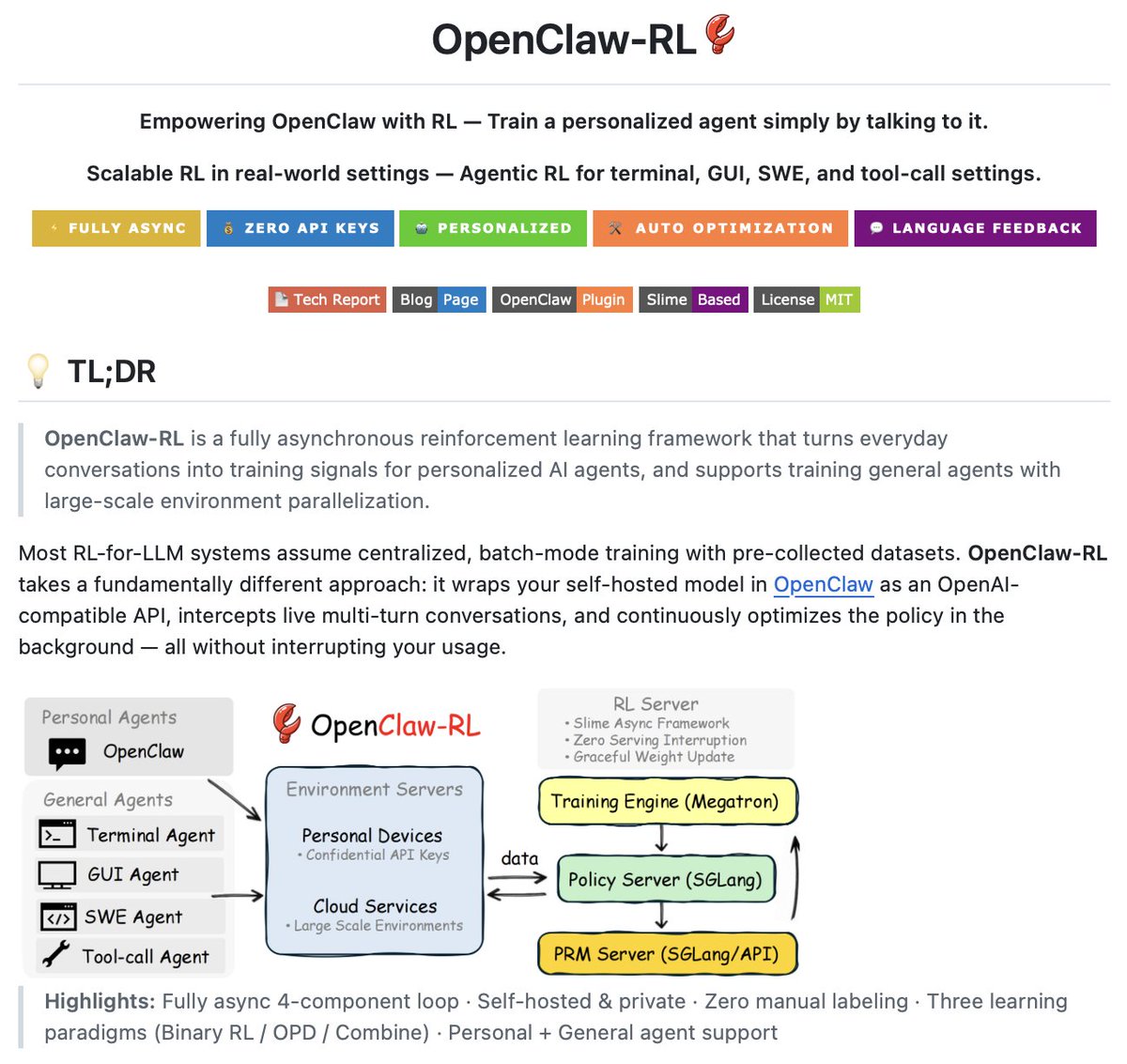
OpenClaw meets RL! OpenClaw Agents adapt through memory files and skills, but the base model weights never actually change. OpenClaw-RL solves this! It wraps a self-hosted model as an OpenAI-compatible API, intercepts live conversations from OpenClaw, and trains the policy in the background using RL. The architecture is fully async. This means serving, reward scoring, and training all run in parallel. Once done, weights get hot-swapped after every batch while the agent keeps responding. Currently, it has two training modes: - Binary RL (GRPO): A process reward model scores each turn as good, bad, or neutral. That scalar reward drives policy updates via a PPO-style clipped objective. - On-Policy Distillation: When concrete corrections come in like "you should have checked that file first," it uses that feedback as a richer, directional training signal at the token level. When to use OpenClaw-RL? To be fair, a lot of agent behavior can already be improved through better memory and skill design. OpenClaw's existing skill ecosystem and community-built self-improvement skills handle a wide range of use cases without touching model weights at all. If the agent keeps forgetting preferences, that's a memory problem. And if it doesn't know how to handle a specific workflow, that's a skill problem. Both are solvable at the prompt and context layer. Where RL becomes interesting is when the failure pattern lives deeper in the model's reasoning itself. Things like consistently poor tool selection order, weak multi-step planning, or failing to interpret ambiguous instructions the way a specific user intends. Research on agentic RL (like ARTIST and Agent-R1) has shown that these behavioral patterns hit a ceiling with prompt-based approaches alone, especially in complex multi-turn tasks where the model needs to recover from tool failures or adapt its strategy mid-execution. That's the layer OpenClaw-RL targets, and it's a meaningful distinction from what OpenClaw offers. I have shared the repo in the replies!
 Watch video
@VadimStrizheus ·
99% of OpenClaw users are doing it all wrong. Your OpenClaw agent shouldn't be doing anything but: - Thinking - Reasoning - Delegating Create subagents/sessions in your OpenClaw gateway and have them code, research, write, outreach, etc. Have your agent manage agents, thats where the future is headed.

@BowTiedCyber ·
I think I cracked the code. Run @openclaw with @OpenAI 4.1-mini 1M context window Impressive reasoning And costs pennies This was an hour of using openclaw I can dig this

@EXM7777 ·
i spent weeks deep in OpenClaw... building skills, testing memory systems, switching models, debugging things that were broken OpenClaw is built for people who WANT to maintain their own infrastructure > daily tweaking > constant troubleshooting > full control of every layer and that's cool if you're into it but if you're using AI to gain actual leverage in your business, your content, your workflow... you need immediate ROI on what you build you don't want to spend 3 hours fixing a memory system before you can use it meanwhile Anthropic is quietly absorbing every OpenClaw feature: - /loop runs recurring prompts on autopilot - remote control lets you manage sessions from your phone - scheduled tasks fire without you touching anything - memory that actually persists across sessions and it's all native... OpenClaw will 100% remain the go-to for people who want a fully local, fully customizable setup... that's a real use case but for everyone else, the gap is closing fast
@EXM7777 ·
i spent hours inside OpenClaw and its alternatives so you don't have to... here's the truth nobody wants to hear: for the vast majority of people, it's a pure waste of time > 20+ hours/week setting up and maintaining it > constant memory loss > debugging that never ends > and you'll probably never get past the most basic use cases it's not a toy and it's definitely not plug-and-play... it's a factory you have to run yourself what i'd do instead: take that time and split it - half goes into building the same workflows in Claude Code or Codex - half goes into getting dangerously good at one skill more leverage, surely less automated, but 10x the results (remember that eventually Anthropic, OpenAI and Google will implement OpenClaw's features in their agentic platforms)

@a16z ·
Why did OpenClaw take off? “I found it relatively easy to set up and get going… I didn’t have to spend seven hours just to do the Telegram use case and start playing with it.” "I just think it's sort of that, like just that level of accessibility to users who are maybe not living in a codebase day-to-day." "The other agent frameworks were pretty difficult to use, incredibly flaky, [I] didn't really want to spend a lot of time debugging someone else's stuff." "There's another major part of this that it can extend itself." "It's the first agent I've seen where I can say, 'I want integration with something.' And it's like: 'well, I've never seen this before, there's no package for that, but let me try to put something together.'" "There is definitely a long-running nature of it. You leave it running for a night and you're like, keep working on this until you finish." @stuffyokodraws @appenz on the AI + a16z Podcast
 Watch video
@cathrynlavery ·
🦞 Spent last night debugging why my OpenClaw wasn’t working with CLI method setup. Openclaw models auth login —provider anthropic —method cli —set-default Root cause: CLI backend bugs breaking session handling → silently triggering overages. Built a patched CLI that fixes it. Now everything runs on the subscription plan on Claude locally. No extra usage on. Open source in my openclaw-ops↓
@profitfounder ·
39 OpenClaw Use Cases to Automate Your Business (and Life) 0:00 Intro 00:01:11 Why try OpenClaw 3:50 #1 beginner mistake 5:07 His full setup 8:44 Fixing OpenClaw memory 11:42 DMs to invoices 15:20 Vibe engineering 19:10 30+ real use cases 24:28 Prompt injection safety 27:03 Worth $200/month? 30:25 Landing page via Telegram 45:15 Auto domain buying 45:40 AI with a credit card 48:15 Auto-booked airport parking 55:54 Benji: personal life OS 59:23 3 use cases or die 1:02:24 170K from one post 1:04:51 Reducing SaaS churn 1:10:43 Why he ditched Notion 1:19:42 Tamagotchi for OpenClaw 1:19:53 Roomba with an iPad with @thekitze
 Watch video
@sharbel ·
My FULL OpenClaw Phone Setup (steal my Telegram config!): 00:00 Why you do not need a laptop running all day 01:45 The phone, Telegram, cloud server, OpenClaw architecture 02:12 Why I’m using Hostinger for this setup 03:01 Installing OpenClaw from your phone 05:17 Connecting an AI provider 06:17 Choosing Telegram as the messaging platform 06:45 Creating a Telegram bot with BotFather 07:45 Pairing Telegram with OpenClaw 08:45 Testing the OpenClaw dashboard and Telegram bot 09:51 The real setup, teaching your agent who you are 11:03 What to connect next, Notion, Gmail, calendar, scheduled tasks 11:27 Practical benefits and limitations 12:35 Security warnings 12:59 Final thoughts
 Watch video
@Sumanth_077 ·
Train your OpenClaw agent by just talking to it! OpenClaw-RL is a reinforcement learning framework that turns everyday conversations into training signals for personalized AI agents. Most RL systems for LLMs assume batch-mode training with pre-collected datasets. You label data manually, train offline, deploy, and hope it works. OpenClaw-RL wraps your self-hosted model as an OpenAI-compatible API through OpenClaw, intercepts live conversations, and continuously optimizes the policy in the background while you use it. How it works: Four independent async loops run simultaneously - agent serving, rollout collection, reward judging, and policy training. The model serves your requests while training happens in the background. No manual labeling. The system automatically classifies messages, uses the next user message as a signal, runs reward evaluation asynchronously, and submits samples to the trainer. Two learning modes: 1. Binary RL (GRPO) - Reward model scores each turn as good/bad/neutral. Works with thumbs up/down or environment success/failure. 2. On-Policy Distillation (OPD) - Extracts textual hints from feedback like "you should have checked the file first." Creates an enhanced teacher for token-level training. Everything runs on your infrastructure. No external API keys required. Conversation data stays local. It's 100% open source Link to OpenClaw-RL in comments!

@techNmak ·
🚨 NVIDIA just made OpenClaw safe to run 24/7. Here's how they did it without breaking what makes OpenClaw useful. The problem with AI agent security: Most solutions restrict what the agent can do. → Can't access files → Can't make network requests → Can't call APIs But that defeats the purpose. OpenClaw's value IS its access. NemoClaw takes a different approach: Four protection layers, two enforcement modes: Locked at creation (immutable): → Filesystem: Only /sandbox and /tmp are writable → Process: Privilege escalation blocked via Landlock + seccomp Hot-reloadable at runtime (flexible): → Network: Add/remove allowed hosts without restart → Inference: Reroute model calls to different backends Why this split matters: > Filesystem and process boundaries should never change. That's your security foundation. > But network and inference policies need flexibility. New integrations. New models. New use cases. NemoClaw gives you both: Immutable security boundaries + flexible operational policies. When OpenClaw tries to reach an unlisted host: 1. OpenShell blocks the request 2. Surfaces it in the TUI for your approval 3. You decide: Allow or deny 4. If allowed, policy updates without restart That's "trust within boundaries, intervene on exceptions." Image credit - The New Stack


@sandraleow ·
my current OpenClaw architecture setup: - chat in "telegram topics" - writes to their memory files - auto updates to my main dashboards - agents pick up tasks from "backlog" during heartbeat cron and executes proactively


@MillieMarconnni ·
This is wild. Every AI agent you've ever used forgets what went wrong the moment the conversation ends. MetaClaw changes that completely. Chinese developers built this OpenClaw wrapper that auto-scores each turn, generates new skills when the agent struggles, and injects them back at the next interaction all running async alongside live serving. No offline retraining loop. No separate training infrastructure. The agent improves while it's deployed. This is what self-improving AI actually looks like. 100% Opensource. Link in comments.
 Watch video
@H0wie_Xu ·
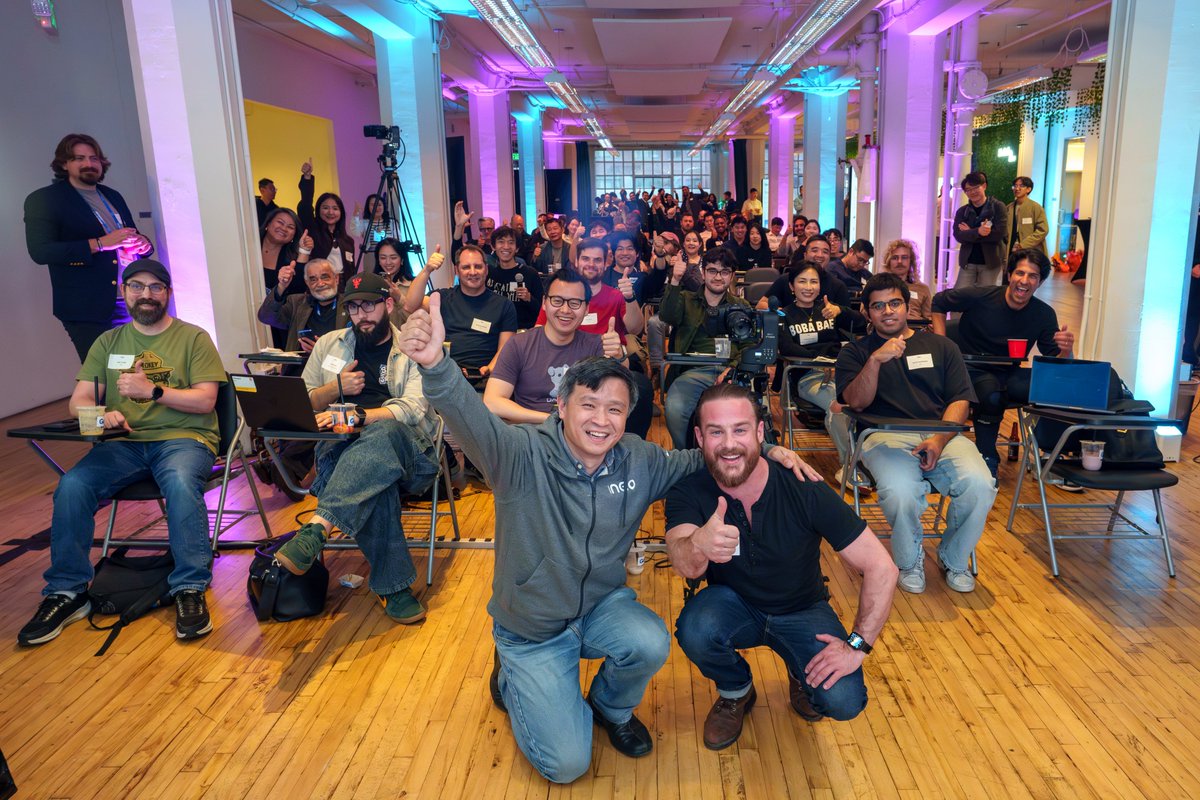
My AI team at @GenDigitalInc co-hosted an @openclaw security event at @OneRSAC in SF yesterday with maintainers @joshavant @odysseus0z @vincent_koc and builders across the ecosystem 📷 The energy is high. Josh laid out OpenClaw team's commitment to security, but one thing was clear: OpenClaw needs more helpers! If you want to make agentic systems secure, DM me. We’re helping to assemble a security working group around OpenClaw. @openclaw @steipete @neobrowser

@morganlinton ·
So while I’ve been posting about, and having a blast with Grok Bot, Muse, and now Dots. This doesn’t mean I’ve stopped using OpenClaw. I still have a dedicated Mac Mini that I run OpenClaw on, and I love it more than ever. And of course you don’t need a Mac Mini, it also runs great on a $10/mo VPC For anyone that hasn’t tried OpenClaw recently, I can tell you the team has been doing an amazing job, it’s very stable, updates work seamlessly now, and you can just tell how much more polished it is. I use different agents for different things, but I honestly don’t see a world that exists anytime soon where OpenClaw isn’t a part of my daily life. If you really want to customize the heck out of a personal ai agent, OpenClaw really is the best it has ever been. And yes, I think this is a time in history where having multiple ai agents is going to be very normal. You don’t just need to pick one, spread the love ✌️ ❤️ 🦞

@LuizaJarovsky ·
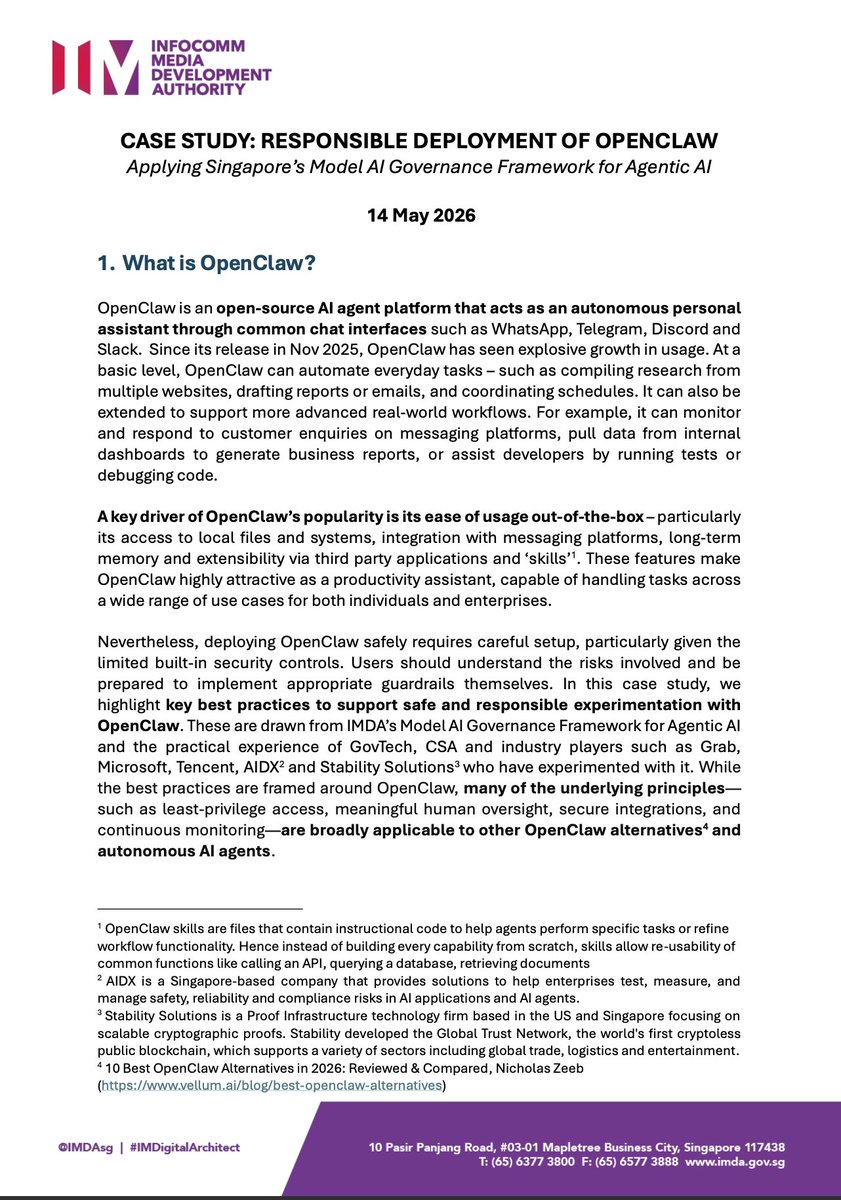
🚨 Singapore published a case study applying its Agentic AI Framework (the world's first of its kind) to OpenClaw. [Download it below]. If you use AI agents, check out these SAFETY best practices: 1. Assess and bound the risks upfront - Avoid deploying OpenClaw in its open-source form in mission-critical environments - Avoid creating a single “all-powerful” OpenClaw agent with unrestricted access - Avoid installing OpenClaw on primary work or personal devices that contain sensitive data - Avoid granting OpenClaw ‘superuser’ privileges - Avoid granting OpenClaw unrestricted access to files and applications 2. Make humans meaningfully accountable - Adopt a risk-based approach to determine the appropriate level of agent autonomy with the sensitivity of data and the criticality of tasks - Identify checkpoints that require human approval - Enforce human approval through system-level controls where possible 3. Implement technical controls and processes a) During design and development - Enforce control-plane separation for key safety controls - Route outbound connections through a policy-enforcing proxy - Review and tighten the OpenClaw configurations, which are permissive by default - Avoid giving OpenClaw access to sensitive data - Use dedicated identities and credentials for the agent - Avoid exposing credentials to OpenClaw directly - Regularly rotate API keys, OAuth tokens, and other credentials used by the agent - Use trusted skills only - Use trusted sources b) Testing before deployment - Adopt a structured evaluation approach, organized around capability-based risk identification, concrete risk scenarios, as well as environment and tool mapping - Test and verify that safety controls are working as intended - Test and verify that human-in-the-loop (HITL) is working as intended - Test and verify that safeguards remain effective against indirect prompt injections, especially when third-party skills are used c) Post deployment - Ensure that all agent actions are logged and attributable - Avoid leaving the agent unsupervised for extended periods - Monitor the agent for behavioral anomalies and policy violations - Treat rebuild as an expected control, especially in the event of compromise or anomalous behavior - Regularly update OpenClaw and patch known vulnerabilities promptly 4. Enable end-user responsibility - Provide personnel training and/or clear usage guidance - 👉 This is a super interesting case study, and a must-read for those developing or deploying AI agents. Download it below. 👉 To learn more and stay up to date, join my newsletter's 95,200+ subscribers (link below).

@arsh_goyal ·
So I finally setup OpenClaw on this 4999$ NVIDIA DGX Spark and below is the complete video. Quick context if this is new to you. OpenClaw is an open source AI assistant that runs on your own machine. It doesn't just answer a prompt and stop. It keeps running in the background, checks its tasks, and acts on its own. Basically a personal agent that works while you sleep. The DGX Spark is NVIDIA's tiny AI supercomputer for your desk. GB10 chip, 128GB unified memory, runs big models locally without sending your data to the cloud. Setup was easier than I thought. One command pulled OpenClaw, the OpenShell sandbox, and a local model. Then I connected it to Telegram for remote access. Now I message my agent from my phone and everything runs on the device. No cloud bills, no data leaving my desk. Full walkthrough in the video below if you are a beginner looking forward to setup. #nvidia #ai #tech
 Watch video
@IMJustinBrooke ·
Been using OpenClaw daily now. It’s not like other agentic builders or automation builders. You have to think a little differently when using it. Needs wiggle room. It’s like managing an overachiever. Huge energy and initiative, but needs rails. Lots of rails!

@TopherNOW ·
You're not just using AI. “You are building out your team.” That's how Student Housing broker, @adamstatonsmith, framed OpenClaw on yesterday's live session in CRE AI Studio His system breaks into 5 agents, helping with everything from: • Chief of Staff (triage + priorities) • Research (market intel + comps) • Database (enrichment + seller flags) • Recruiting (who to hire + why) • Call Prep (telling him who to call, and why now) Adam's biggest takeaway from the past 60 days: OpenClaw breaks… and you learn by fixing it. That’s the unlock. Check out the full session at https://t.co/olL3eTXzbs (7 day free trials still available)
 Watch video
@thekitze ·
in the first week of using openclaw i tried to make my own agent with a better ui instead of using telegram/discord i scrapped the idea because i thought "no way i can make my own" after wrestling with it for like 40 days, i'm finally making an alternative not a simpleclaw, nanoclaw, blahclaw... not even a claw, just something that works for a broad category of people without a lot of fidgeting and config sharing progress with @tinkererclub

@marty_kausas ·
Just spoke to a CEO that's deployed 1k agents. I'll repeat: ONE THOUSAND AI agents. He's using OpenClaw aggressively and is mandating every one of his teams do the same. Me: "Has OpenClaw screwed anything up?" Him: "Yes, but it's worth it. Just don't give it access to a prod db." We're going to lean more heavily into more internal agents as well, although I think I'd prefer more pre-built AI agent builder products over just straight OpenClaw. But would love opinions from folks that have tried both for different use cases.

@aiDotEngineer ·
In @steipete's latest State of the Claw, he gives an update on 5 months of @OpenClaw and some behind the scenes on what it's like maintaining the fastest growing open source of all time: https://t.co/pTKaA0JMtN eg: - 60x more security reports than curl - a "Bullshit Taxonomy" of illegitimate reports - Nation State attacks - 12%-20% of skills contributions malicious - contributors burning multiple Codex Pro per day - academic FUD Agents are both the product AND the attack vector. @simonw's Lethal Trifecta is not solved. Come for Pete's recommendations, what OpenClaw is doing on security, OpenClaw Foundation roadmap, and then subsequence audience Q&A with @swyx on taste, dreaming, and OpenAI.

@SimonHoiberg ·
OpenClaw <> Notion. It's a phenomenal user experience! 📝 Wiki & notes. My OpenClaw team has direct access to my entire wiki & knowledge base (both personal and for my company). It's obviously helpful for OpenClaw to have access to information, but the real hack is allowing it to groom it, maintain it, and keep it up to date. I use OpenClaw 90% through voice, and whenever we discover something outdated, I just tell it to update it. I can do this on the fly, from my mobile, wherever I am. Preventing my internal wiki from going stale used to be a big task, but is now super smooth and easy. ✅ Projects. My OpenClaw team uses Notion's project boards to create, delegate, and collaborate with each other, and with my human team. I see some people creating their own "Mission Control" dashboards, and I have no idea why? Just use Notion for this, it's perfect. 💬 Editorial. This experience is just wonderful. I collaborate with my OpenClaw agent on writing great YouTube scripts, and we'll be in the same Notion doc together. I can see his updates live as they happen, and he can see mine. I can leave comments on specific blocks, and he can retrieve them and address them. Just like a real-world collaboration. What makes OpenClaw truly amazing is how you interface with it: Telegram (chat) and voice. But you still not some UI for things, and Notion makes up 90% of what you'd need. So if you're not using OpenClaw <> Notion already, give it a try.


@ThePracticalDev ·
Getting OpenClaw running in a VM is a smart way to keep your machine clean. This dev walks through the whole setup on Ubuntu 25: Node version gotchas, the onboarding flow, and the dashboard vs. TUI pairing quirk you'll want to know before you start. Submitted for the @OpenClaw Writing Challenge. { author: Gabriel Guzman } https://t.co/k5ndRrZPBm

@MariaShen ·
Lesson from using openclaw: the harnesses & processes put around ai models are like education / social norms put around people. the smartest brain in the world is useless without the right education & upbringing. my openclaw agent started like a feral, savant child running loose on my computer. It couldn't manage context. It would send way too many tokens in (I had to deal with API calls that were using close to 1M tokens for simple requests). It didn't know how to check its work. I have to change configs, add instructions, interrogate it on why it made mistakes and iterate on process. now it's slowly starting to do the right things. still a long way to go before it's truthworthy.

@MossAI_Official ·
🎙️ AMA Recap | 10x your life with Openclaw We sat down with three builders: @JiraiyaReal, @ariesyuangga, and @Smashe__ to unpack what it actually takes to build with autonomous agents. 👇 Q: Why OpenClaw over a regular chatbot? A: Chatbots react. OpenClaw agents act — continuously, on schedule, or on trigger. Hooks, cron jobs, and heartbeats turn one-shot prompts into persistent workers running 24/7. Q: What are people actually building? A: Aries runs 20+ specialist agents and watched five of them ship a full SaaS platform in a single day. Jiraiya built a multi-agent forge that externalizes his entire Web3 marketing methodology into a persistent team agent. Zane's trading alert system, wired to live onchain and market data, now beats his own entry timing. Q: What's the hardest part? A: Steep learning curve, opaque debugging, and underestimated context management. Transparency — knowing whether your agent is thinking or just stuck — remains the top friction point. Q: What would you change about OpenClaw tomorrow? A: A visual monitoring dashboard, smoother native multi-agent orchestration, and better onboarding for non-technical users. Q: Best advice for beginners? A: Start with your SOUL.md. Pick one high-value automation you need to win. Use a VPS, and vet every ClawHub skill before running it. Moss Intern Tips👇 ✅ Autonomous agents compound. The productivity edge grows the longer they run. ✅ Context engineering is the foundation. Poor context means high costs and unreliable outputs. ✅ Start small. One win unlocks everything else.

@RoundtableSpace ·
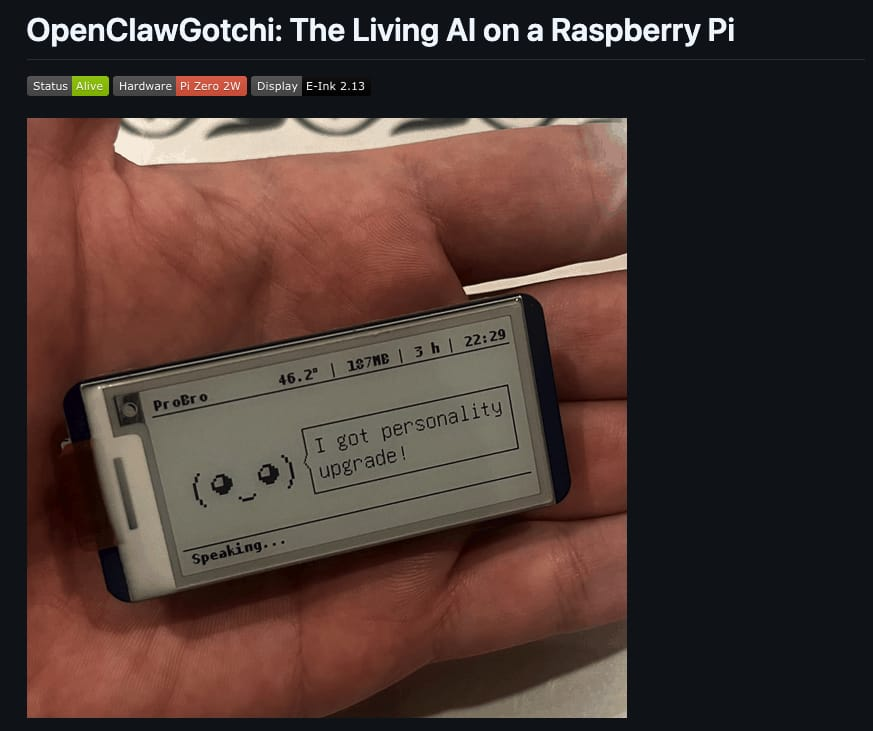
Someone built OpenClawGotchi - a tiny AI agent with actual personality. Built on OpenClaw, Moltbook, and Pwnagotchi, it runs on a Raspberry Pi with an E-Ink display and only 512MB of RAM. It can code, use bash, commit changes, transcribe voice, analyze images, and switch into a deeper reasoning mode through Claude Code. Not a chatbot sitting in a browser. A pocket-sized autonomous companion running on bare metal small enough to hold in your hand, capable enough to live inside your daily workflow.

@Shane_BTT ·
99% of people are using OpenClaw wrong. Everyone’s LARPing as a “second brain” architect — 12 MCPs, 13 sub‑agents, fully automated everything — and then wondering why the output feels like pure https://t.co/V3DjAu2hv9 without your brain in the loop is trash, and it always has been. The same people who got burned by “fully automated content,” “hands‑off SEO,” and bot‑trading are now autopiloting their entire life into the wall.OpenClaw is crazy good tech, but it’s an amplifier, not a replacement. If you check out mentally, yeah, you’ll automate your life and business — the results will just suck. The people actually winning? They’re not removing themselves from the process; they’re feeding it their own ideas and using OpenClaw to move 10x faster on things they actually care about.

@0xDvnl ·
The main takeaway after trying to build autonomous OpenClaw company for the past few weeks: Build with Claude Code. Run with OpenClaw agents. Two completely different modes. Most people try to do both using one tool. Claude Code is for the work that shapes everything downstream. Core infrastructure. UX decisions. Strategy docs. Anything where a wrong move compounds. You sit in the driver's seat. You validate every output. You think together. Agents are for the work that repeats. Social posts. Newsletters. SEO. Outreach. Research. Content assets. You set the system. They execute. You approve the daily summary. Build the engine yourself. Then let it run.

Best OpenClaw tweets
Xholic studies what works in your niche, drafts posts in your voice and schedules them for the hours your audience is online.
No card needed · Nothing to cancel
Browse all tweet collectionsLive demo: no sign-up or login needed · takes about 2 minutes
Keep exploring