Twitter impressions are the total number of times a tweet is displayed on a screen, and they are not unique. If one person sees the same post multiple times, each view counts, which is why a tweet can earn more impressions than your follower count.
You’ve probably opened X (Twitter), seen a post with a big impression number, and wondered whether that means people cared. Sometimes it does. Sometimes it just means your post got shown a lot and ignored.
That’s the useful way to think about twitter impressions. They are a distribution metric first. They tell you whether X is putting your content in front of people. Your primary job is figuring out which impression sources are helping you grow, and which ones are just inflating the view count without leading to replies, profile visits, or followers.
Your Guide to Twitter Impressions
If you’re checking analytics after every post, impressions are usually the first number you notice. That makes sense. It’s the clearest signal of whether X gave your post any real distribution.
A twitter impression happens when your tweet appears on someone’s screen. That includes timelines, search results, and other places inside X where your post is displayed. It does not mean a unique person saw it, and it doesn’t mean they engaged.
For creators, founders, and marketers, the practical question isn’t “what are impressions?” It’s “what do they tell me to do next?” If impressions are low, you likely have a distribution problem. If impressions are high but engagement is weak, you likely have a message problem. If impressions are coming mostly from followers, you may be visible but not expanding.
Practical rule: Treat impressions as the top of the funnel. They tell you whether your content was surfaced widely enough to earn replies, clicks, and follows.
Impressions vs Reach vs Engagement
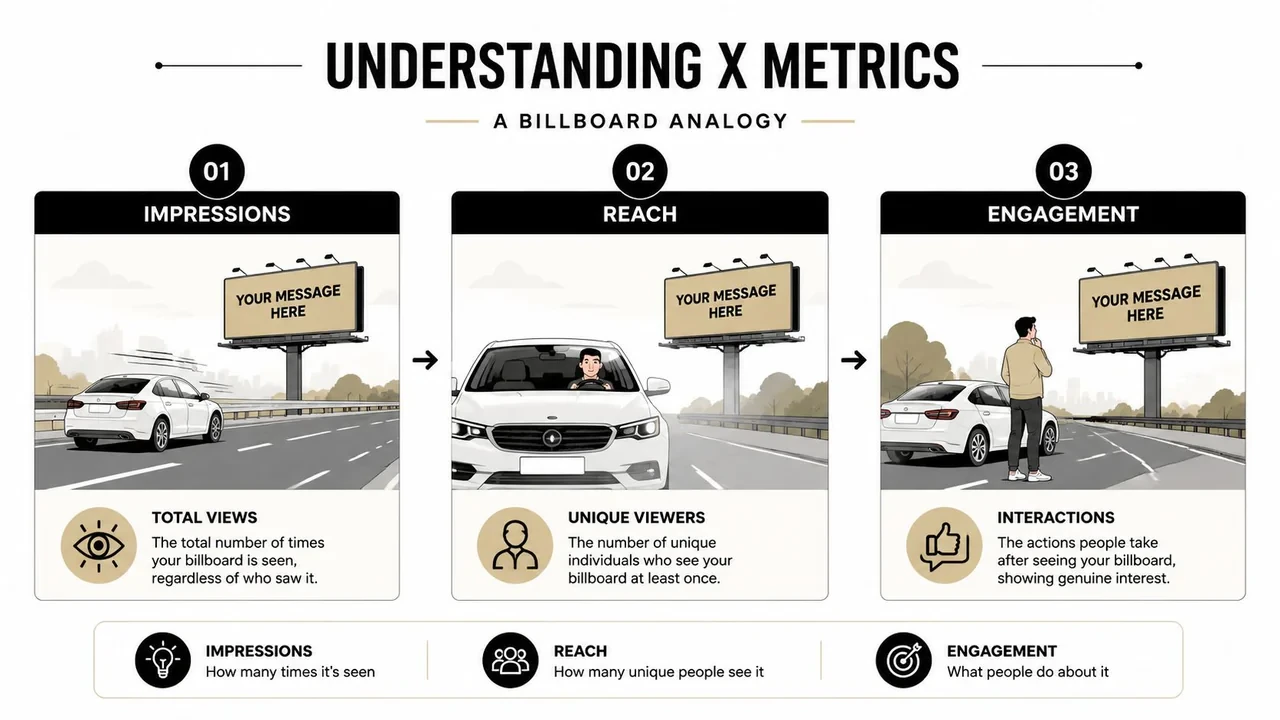
The fastest way to understand these metrics is the billboard analogy. A tweet is the billboard. People passing by can see it, ignore it, or act on it.
Impressions
Impressions count total displays, not unique people. Quintly notes that impressions count every time a tweet appears on a user’s screen in timelines or search results, and repeated views by the same person count separately. Their example is simple: if one person sees a tweet 5 times and another sees it 2 times in search, the tweet gets 7 impressions. Quintly also notes that impressions include views of retweets of the original post, but not views on third-party websites or platforms, as explained in their guide to Twitter impressions and reach.
That matters because a post can look “big” on paper while still reaching a relatively small pool of people multiple times.
Reach
Reach is about unique viewers. If impressions answer “how many times was this shown,” reach answers “how many different people saw this.”
On X, practitioners often talk about reach because it helps separate repeated exposure from actual audience breadth. If the same followers keep seeing your posts in timeline refreshes, impressions can climb while reach stays much lower. That’s why reach is better for audience size, while impressions are better for distribution volume.
A simple way to use both: impressions tell you whether X is pushing the post, and reach tells you whether that push is broad or repetitive. If you want a deeper post-by-post framework, Xholic’s guide to Twitter analytics is useful for comparing visibility metrics in context.
Engagement
Engagement is what people did after seeing the post. Likes, replies, reposts, clicks, profile visits, and other interactions belong here.
Many people misread twitter impressions in this way. They celebrate high views without checking whether anyone cared enough to act. A post with moderate impressions and strong replies is often more valuable than a post with broad distribution and no reaction.
| Metric | What it tells you | Best use |
|---|---|---|
| Impressions | Total times shown | Measure visibility and distribution |
| Reach | Unique viewers | Estimate audience breadth |
| Engagement | Actions taken | Measure resonance and response |
High impressions answer “was it seen?” Engagement answers “did it land?”
Where to Find Your Impression Data on X
A large majority of users only look at the number shown under a tweet. That’s useful, but it’s only one layer. You want both account-level patterns and post-level detail.
Check account level analytics
Open X Analytics to review broader trends across your account. This helps you spot whether your impressions are generally rising, flat, or tied to a handful of standout posts.
Use account-level views to answer questions like:
- Which posting days work best
- Whether visual posts outperform text-only posts
- Whether your recent consistency changed visibility
- Whether your best posts are isolated wins or repeatable patterns
If you want a walkthrough of where these reports live and how to read them, this guide on how to see Twitter analytics is a practical companion.
Check post level analytics
For individual tweets, open the post and use the analytics view available from the post itself. That’s where you inspect the actual performance of a specific hook, format, or angle.
Post-level review is where impressions become actionable. Don’t just ask “how many?” Ask:
- Did this post get shown mostly because followers saw it?
- Did it get search visibility?
- Did profile visits contribute?
- Did the post earn replies early, or did it stall immediately?
A founder posting product lessons, for example, might find that short opinionated posts earn follower timeline impressions, while sharper contrarian takes get more discovery outside the existing audience.
Know the history limits
Historical access has hard limits. According to Minter.io, historical data for impressions is available for tweets posted in the last 30 days, while the platform itself can load up to 3,200 of your most recent tweets, as covered in their article on historical insights data for Twitter.
That changes how you should work. If you care about trend analysis, export or record your data while it’s still fresh. Don’t wait months and assume the granular impression picture will still be there.
Realistic Impression Benchmarks for Creators
The wrong way to judge a post is by asking whether the impression number looks big. Big compared to what?
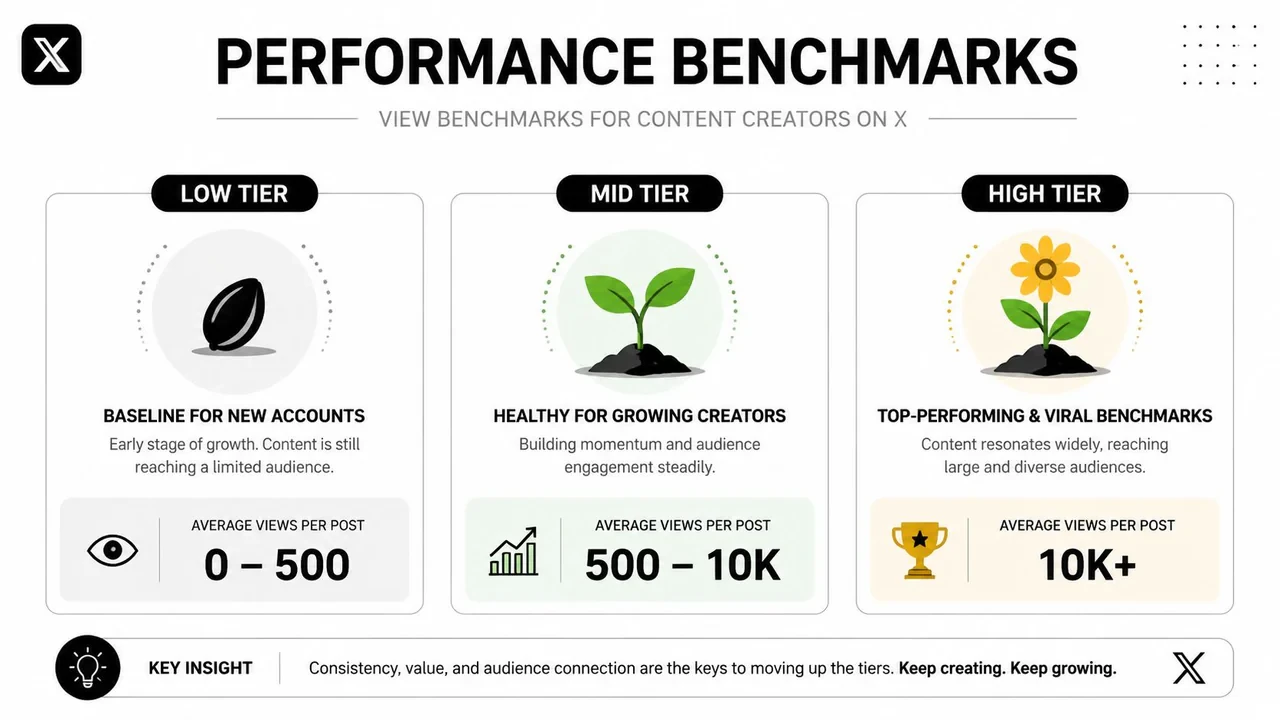
For creators, a more useful benchmark is relative to follower count. A smaller account can outperform a larger one if the post earns stronger distribution. That’s why benchmark thinking matters more than raw numbers.
A practical benchmark
A commonly cited heuristic for 2026-facing guidance is that a tweet getting 1x to 2x your follower count in impressions is a solid baseline, while 5x to 10x your follower count suggests strong viral potential. The same guidance also highlights the first 30 to 60 minutes as a primary window because strong early engagement can drive larger impression totals, as discussed in this piece on impressions on Twitter.
That gives you a cleaner scorecard:
- Baseline performance means the post reached roughly what your current audience size would suggest.
- Breakout performance means the algorithm likely pushed it beyond your usual bubble.
- Underperformance means either the post didn’t get enough early traction or the framing didn’t earn enough attention.
What to compare alongside impressions
Don’t compare impressions in isolation. Compare them with:
- Follower count to understand whether the post broke beyond your audience
- Engagement efficiency by looking at engagements relative to impressions
- Early momentum to see whether the post had a strong opening window
- Format type so you know whether image posts, video posts, threads, or simple text hooks are carrying your account
A high-performing account usually doesn’t have one magic tweet style. It has a few repeatable formats that consistently earn distribution.
Here’s a simple interpretation model:
| Pattern | Likely meaning |
|---|---|
| High impressions, strong engagement | Good content and good distribution |
| High impressions, weak engagement | Broad exposure, weak message |
| Low impressions, strong engagement | Good post, weak initial distribution |
| Low impressions, weak engagement | Format, hook, and timing likely all need work |
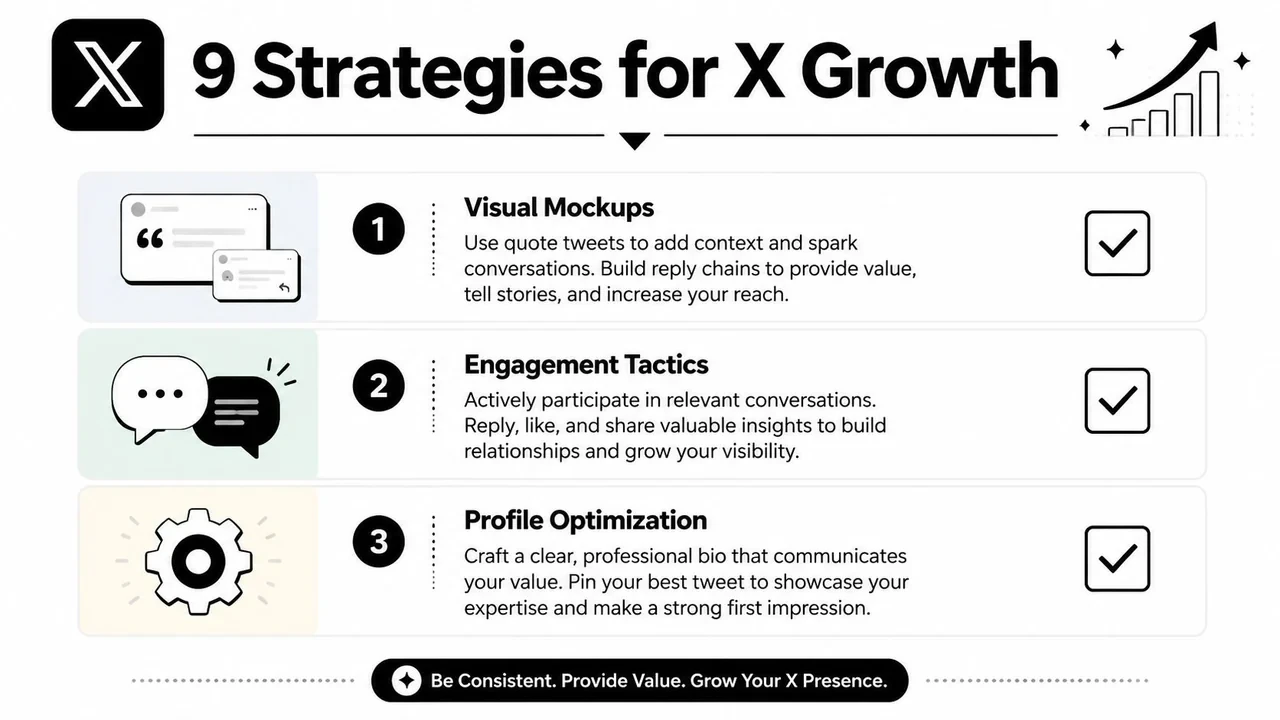
9 Actionable Strategies to Increase Twitter Impressions
Most advice on twitter impressions stays generic. Post consistently. Use visuals. Engage more. None of that is wrong, but it doesn’t tell you which mechanics create non-follower distribution.
By 2026, X analytics can show where impressions came from, including follower timelines, the For You feed, search, and profiles. That matters because the primary breakout lever is learning which content formats earn algorithmic distribution beyond followers, as noted in Tweet Archivist’s guide to Twitter impressions in 2025.
Use impression sources as your strategy filter
-
Audit which posts earn non-follower impressions
If a post gets most of its views from follower timelines, it may be performing fine without expanding your audience. Look for posts that attract For You, search, or profile-driven discovery. -
Write hooks that create immediate curiosity
The first line decides whether people stop. Clear opinion, tension, novelty, or a specific lesson usually travels better than vague setup. -
Design for replies, not just likes
Posts that invite a reaction often create stronger early momentum. Questions can work, but sharper prompts usually work better than generic “what do you think?” endings. -
Use visual formats deliberately
Visual posts often earn stronger visibility than plain text. Screen recordings, images, and short video can help a good idea survive the scroll. -
Join conversations early
Distribution doesn’t only come from your own posts. Smart replies on high-momentum threads can put your profile in front of new viewers, especially when the original tweet is still climbing. -
Turn winning structures into templates
If a post format repeatedly earns For You distribution, keep the structure and change the insight. Don’t reinvent every tweet from scratch. -
Separate search content from timeline content
Some posts work because people search for them later. Others work because they create an instant reaction in-feed. Treat those as different jobs. -
Post when your audience is active enough to create momentum
Timing matters most when it affects the opening engagement window. A strong post launched into a quiet hour often dies before X has enough signal to push it wider. -
Build a review loop around source breakdowns
Every week, compare your best posts by impression source. You’re looking for patterns like “hot takes earn follower timeline views” or “tactical teardown posts earn search and profile impressions.”
For content ideation, examples matter more than theory. This collection of tweets that actually work is useful for studying structures worth adapting.
Don’t optimize for “more impressions” in the abstract. Optimize for the kind of impressions that come from outside your current audience.
A practical support stack can include native X analytics, your own content tracker, and one workflow tool that helps you stay consistent. Xholic AI fits that use case as an AI-powered X growth toolkit for discovering high-momentum tweets, generating replies, remixing posts, organizing saved ideas, and scheduling with Smart Scheduling. If you need mockups for planning or approvals, the fake tweet generator is useful for creating visual examples responsibly. Mockups should be used for planning, education, presentations, and design work, not to mislead people.
A sample workflow for a founder account
Here’s a simple weekly operating rhythm:
- Monday: Review last week’s posts by source. Mark which ones broke beyond followers.
- Tuesday: Draft three posts using your best-performing structure.
- Wednesday: Publish one original post and leave several thoughtful replies on active conversations in your niche.
- Thursday: Turn one lesson into an image or screen-recording post.
- Friday: Compare which post earned the strongest non-follower distribution and save the pattern.
Sample tweet:
“Most founders think they need better distribution.
Often they need sharper framing.
A useful post said vaguely gets ignored.
The same idea said with tension gets surfaced.”
That kind of post works when it’s specific, easy to quote, and easy to disagree with.
Common Mistakes That Secretly Lower Your Impressions
A lot of creators suppress their own distribution while thinking they’re doing the right things. The biggest mistake is chasing views without checking whether those views led anywhere useful.
Tweethunter’s guidance puts it well: high impressions with low engagement can mean people saw the post and ignored it, while low impressions with high engagement can mean the post was strong but didn’t get enough initial distribution, as explained in their article on how to increase Twitter impressions.
Mistakes that look smart but hurt distribution
-
Leading with a weak first line
If the opening doesn’t stop the scroll, the rest of the post doesn’t matter. -
Posting links too aggressively
If the main goal is to send people away from the platform immediately, don’t be surprised if the post struggles to travel. -
Ignoring your own replies
A post often gets a second life through the conversation under it. If you vanish after publishing, you leave momentum on the table. -
Using the same format for every idea
Some ideas deserve text. Others need an image, a short video, or a thread. Matching format to message matters. -
Treating follower-only impressions as growth
Visibility to your current audience is useful, but it’s not the same as breakout distribution. -
Mistaking volume for strategy
More tweets won’t fix weak hooks, weak timing, or weak content-market fit.
If you plan conversation-based content in advance, a tool like the reply chain generator can help mock up a better thread flow before you post. As with any mockup tool, use it for planning and presentation, not deception.
Turn Impressions into Growth with Xholic AI
Twitter impressions matter because they show whether X is giving your content a chance. But the useful move isn’t staring at the number. It’s learning which posts earn distribution beyond followers, which formats hold attention, and which early actions create momentum.
That’s where a tighter workflow helps. If you can spot rising conversations early, draft stronger replies faster, save patterns from posts that already work, and keep a steady publishing rhythm, impressions become more controllable. For teams and solo creators who want that kind of operating system, Xholic’s article on the Chrome extension for X growth shows how an in-feed workflow can reduce friction.
If you want a cleaner system for finding momentum, generating better replies, remixing proven tweet structures, organizing ideas, and staying consistent on X, try Xholic AI.