You’re probably looking at your X (Twitter) account the same way most founders do. A post gets traction, follower count bumps up, and you assume growth is working. Then a week later, momentum is gone and you can’t explain why.
That’s where twitter follower analytics becomes useful. Not as a monthly report, but as a daily operating system. The point isn’t to admire a bigger number. The point is to understand who followed, who left, what content pulled them in, and what to do next so growth becomes repeatable.
Understanding Twitter Follower Analytics
Follower analytics is not follower counting. It’s audience intelligence.
A founder who only watches total followers is looking at the output, not the mechanism. The useful questions are different. Are new people arriving faster than old ones leave? Are the right people following? Are those followers engaging with your posts, replies, and offers?

Follower count is a lagging signal
The cleanest way to think about this is like a business dashboard. Revenue matters, but smart operators also track retention, churn, and customer quality. X works the same way.
Tweet Archivist’s guide explains that raw follower count isn’t enough. Practitioners track net growth, growth rate, and churn. It defines net growth as new followers minus unfollows, and gives a simple example: an account starting with 5,000 followers and gaining 250 net followers has a follower growth rate of 5%. The same source also shows why percentages matter: 50 new net followers is 5% growth for a 1,000-follower account, but only 0.5% for a 10,000-follower account, as outlined in Tweet Archivist’s follower growth guide.
That framing changes how you evaluate progress. A spike in raw followers can look exciting and still hide weak audience fit. A smaller gain can be far more meaningful if it came from the right segment and held.
Think like an operator, not a spectator
Healthy growth on X has two layers:
- Quantity: Are you adding net followers over time?
- Quality: Are those followers relevant, active, and likely to engage?
Practical rule: A follower number without context is just a vanity total. You need movement, quality, and retention to know if growth is real.
This is why serious teams check follower analytics alongside content performance. If replies drive better follower quality than standalone posts, that matters. If a content pillar attracts passive followers who never engage, that matters too.
A good dashboard helps you monitor that relationship without guessing. If you want a clearer view of account-level signals, this guide to a Twitter analytics dashboard is a useful starting point.
The Core Metrics of Follower Analysis
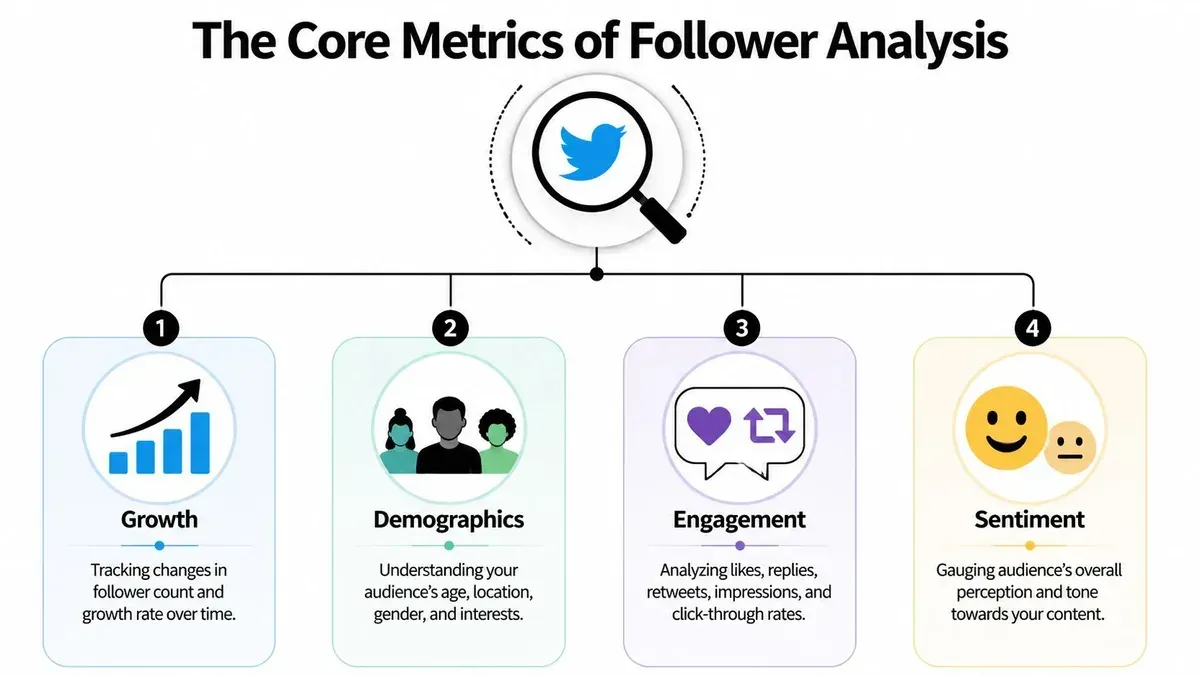
If your analytics setup is cluttered, you’ll miss the signals that change strategy. Most accounts need four buckets: growth, engagement, quality, and demographics.
Growth
Growth tells you whether the audience is expanding or stalling.
Many people stop too early. They look at total followers, see an increase, and move on. That misses the difference between a healthy climb and a leaky bucket. What matters is the pattern over time. Are your posts consistently creating net new audience, or are you replacing people as quickly as you gain them?
Look for these signs:
- Steady net additions: Better than random spikes with flat periods in between.
- Growth tied to specific actions: Useful because it tells you what caused the change.
- Drop-offs after certain content types: A signal that reach and audience fit may be out of sync.
Engagement
Engagement rate is the metric I trust most when follower growth looks good on the surface but feels weak underneath.
Klipfolio defines engagement rate as the percentage of users who interact after seeing tweets and gives a worked example where 250 engagements over 5,000 impressions equals a 5% engagement rate, as shown in Klipfolio’s Twitter analytics metrics guide. That denominator matters because it normalizes performance against visibility, not just audience size.
Two accounts can add followers at the same pace and still be very different. The one earning stronger engagement per impression is usually building a more responsive audience.
High follower growth with low engagement often means your acquisition is broad, but not very qualified.
Quality
Quality is where follower analytics stops being a reporting task and becomes a decision tool.
A useful follower base isn’t just large. It includes people who are active, relevant to your niche, and likely to respond to your future content. On X, that often means checking whether the audience you’re attracting behaves like your target users or just inflates your totals.
Watch for patterns such as:
- Relevant followers: Founders should attract founders, operators, builders, or adjacent buyers.
- Active followers: Accounts that appear in conversations, not silent profiles that never engage.
- Low spam drag: If low-value or suspicious accounts dominate new follows, your content targeting is off.
Demographics
Demographics answer a practical question. Who is this account resonating with?
Follower demographics and audience interests help you validate market fit. If your best posts are attracting people in the wrong geography, wrong language cluster, or wrong professional segment, more content of that type may grow the account while weakening the business outcome.
That’s why a broader analytics view matters. Sprout Social and other serious analytics workflows focus on audience composition for exactly this reason, and if you want a broader framework for reading account performance, this overview of Twitter analytics is worth reviewing.
Collecting Follower Data Native vs Third-Party Tools
Most people should start with native X analytics. Most people who care about growth eventually outgrow it.
The native dashboard is useful for checking post performance, broad account trends, and recent activity. It gives you enough to spot obvious winners and obvious weak spots. That’s good for creators who need a simple weekly review.
What native X analytics does well
Native analytics works well when you need quick answers:
- Post-level checks: Which tweets earned impressions, replies, and attention.
- Basic audience monitoring: Whether your account is generally moving up or down.
- Fast feedback loops: Helpful after posting threads, launches, or experiments.
The limitation is depth. If you want stronger historical context, better segmentation, or cleaner connections between audience changes and specific events, the native view starts to feel thin.
Where third-party tools change the game
Follower analytics became far more operational when tools added historical tracking and segmentation. Tweet Binder and Keyhole report that their analytics can provide historical growth for followers, following, and engagement, making it easier to connect spikes to posts, campaigns, or moments and compare changes across day, month, and year windows, according to Tweet Binder’s follower tracker overview.
That’s the actual shift. You stop asking, “How many followers do I have?” and start asking, “What caused this movement, and should I repeat it?”
| Feature | Native X Analytics | Third-Party Tools (e.g., Xholic AI) |
|---|---|---|
| Historical follower tracking | Limited | Stronger trend visibility over time |
| Audience segmentation | Basic | Deeper filtering and pattern finding |
| Post-to-growth attribution | Partial | Easier to connect spikes to specific content |
| Workflow integration | Separate from creation | Often tied to discovery, replies, drafting, or scheduling |
| Best use case | Baseline monitoring | Ongoing growth operations |
Native analytics tells you what happened. A stronger external stack helps you decide what to do next.
If you’re comparing options, this roundup of free Twitter analytics tools gives a practical view of what different setups can cover.
From Data to Strategy Interpreting the Signals
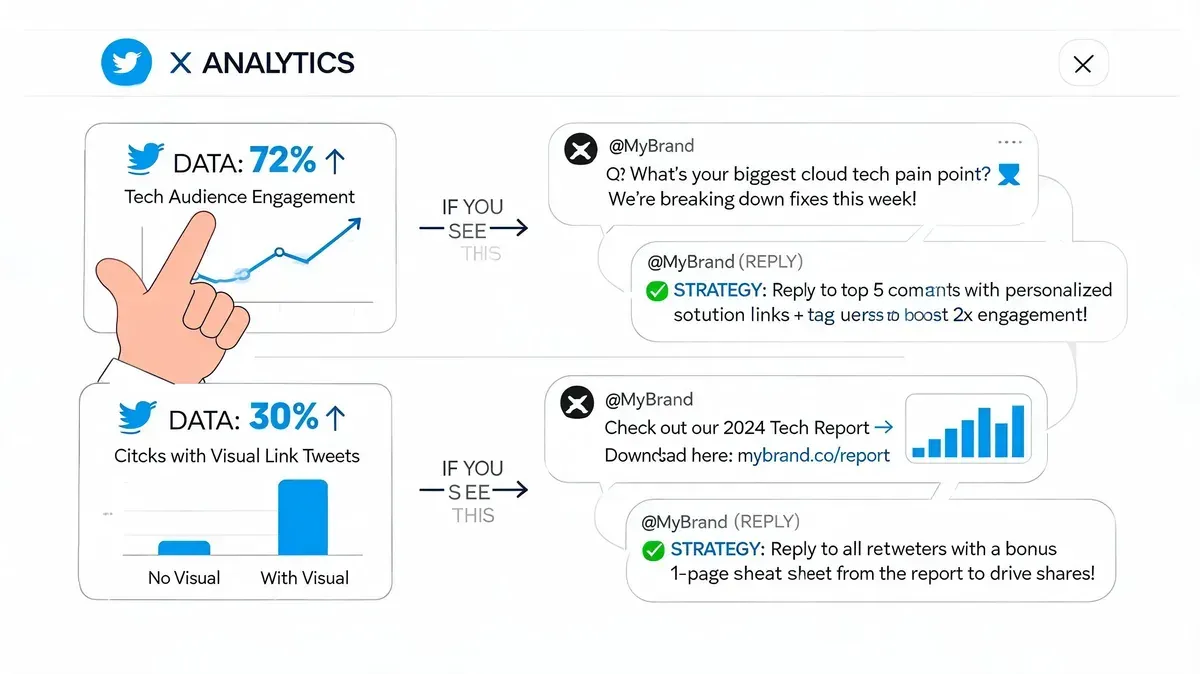
Analytics becomes valuable when it changes your next post, your next reply, and your next scheduling decision.
Sprout Social recommends focusing on demographics, growth rate, engagement rate, and active times because they help confirm market fit, quantify resonance, and measure acquisition speed. It also makes the core cause-and-effect point clearly: if your content matches the interests and behavior of your most engaged audience segments, you improve follower conversion and downstream engagement, as explained in Sprout Social’s guide to analyzing Twitter followers.
If engagement rises but followers do not
This usually means your content is interesting, but your account positioning is weak.
People liked the post. They didn’t see a reason to follow. In practice, that points to one of three issues:
- Your bio is vague: It doesn’t tell visitors what they’ll keep getting.
- Your content is inconsistent: One good post doesn’t signal a reliable pattern.
- Your CTA is absent: You never give readers a reason to stick around.
A simple fix is to align the post and the profile. If a tweet about startup distribution performs well, your bio, pinned post, and recent content should reinforce that topic. Otherwise profile visits won’t convert.
If one topic keeps attracting the right audience
Double down, but do it with structure.
Say your account gets better replies and stronger follower quality whenever you post about shipping product in public. Don’t just “post more about building.” Turn that into a content pillar with multiple formats:
- Short takes: one clear lesson from this week’s work
- Screenshots or mockups: a visual before shipping
- Reply-based distribution: comment on similar conversations early
- Weekly recap thread: what shipped, what failed, what changed
Your best-performing topic is not just a winner. It is a map of demand.
Here’s a simple example of a founder-style post that can be tested and iterated:
We stopped treating X like a broadcast channel and started using it like a customer interview feed. Better replies led to better profile visits. Better profile visits led to better follows. The content didn’t get louder. It got more relevant.
A similar workflow also works for planning visual assets, quote tweet concepts, or campaign approvals. If you need mockups for content review, tools like a fake tweet generator, quote tweet generator, or reply chain generator can help with planning and presentation. They should be used responsibly, not to mislead people.
A quick walkthrough of interpreting engagement signals in practice:
If timing changes performance
Timing data is only useful if you act on it.
When posts consistently perform better during certain windows, don’t treat that as trivia. Use it to reshape your publishing rhythm. If your most engaged followers are active at a particular time of day, queue your strongest original posts for that window and use weaker slots for experiments, reposts, or lower-stakes observations.
That same logic applies to replies. If your audience is active then, the conversations they join are active then too.
An Actionable Follower Growth Workflow with Xholic AI
A useful follower analytics system should end in action every day. Not next month. Today.
The workflow below is simple enough for a solo founder and structured enough for a marketer managing a brand account. It turns audience signals into discovery, replies, posts, and scheduling decisions.

Step 1 Find live conversations with momentum
Start with what your analytics already told you. Which audience segment responds best? Which topic cluster keeps pulling in relevant followers? Which format gets attention from people you want in your orbit?
Then use a tool that supports discovery, reply generation, remixing, and scheduling in one workflow. Xholic AI is one option for this. It tracks high-momentum conversations, helps surface relevant tweets, and supports drafting and scheduling around those signals. Its in-feed workflow is especially useful if you don’t want your analytics process separated from execution. For users who work directly inside the timeline, the Xholic AI Chrome extension for X growth shows how that setup works.
Step 2 Write replies that earn profile visits
Replying for visibility alone is a weak strategy. Replying with relevance is different.
Use your follower data to decide which conversations deserve your attention. If posts about creator monetization bring in strong-fit followers, join those threads first. If posts in a certain niche attract low-quality follows, skip them.
A strong reply usually does one of these:
- Adds a concrete observation: something useful, not generic praise
- Extends the argument: gives the original post another angle
- Contributes a counterpoint: respectfully, with enough substance to stand alone
Example reply format:
- State what you agree with.
- Add one practical nuance from your own work.
- End with a clean takeaway others can quote or reply to.
Step 3 Remix what already works
Your own analytics should shape your drafting process.
If one hook style consistently attracts the right people, reuse the structure without copying the content. If short tactical posts outperform polished promo posts, lean into that. If a thread format repeatedly drives stronger audience quality, build variants of it.
A simple remix workflow looks like this:
- Pull a winning post: yours or a relevant public example in your niche
- Identify the structure: hook, tension, insight, payoff
- Swap the topic: keep the format, change the substance
- Rewrite in your voice: sharper, simpler, more specific
This is also where saved collections matter. Organize strong posts by use case, such as founder lessons, contrarian takes, launch updates, or educational threads.
Step 4 Schedule for audience activity
Don’t post when it’s convenient for you if your data points elsewhere.
Use your audience activity patterns to decide when your best content should go live. Queue original posts for your strongest window. Save low-risk ideas for secondary slots. Keep reply time separate from publishing time so you’re not doing everything at once.
Consistency gets easier when scheduling follows evidence instead of mood.
A lightweight weekly rhythm works well:
- Early week: review last week’s audience and content signals
- Midweek: join active threads tied to your best-performing topics
- Throughout the week: draft remixes and original posts from proven structures
- Before publishing: slot posts into active windows instead of posting manually at random
Common Mistakes in Analyzing Follower Data
Most follower analytics mistakes come from impatience. People want fast certainty from noisy data.
Here are the traps that waste the most time:
- Obsessing over daily follower count: Daily movement is noisy. Review short-term data for patterns, not emotional validation. A better habit is looking at follower movement alongside content and engagement signals.
- Ignoring unfollows: Growth without churn awareness gives you a false read. If certain posts bring followers in and push others out, that pattern matters.
- Treating one spike as a strategy: A viral post can distort your judgment. Repeatability matters more than a one-off jump.
- Looking at follower growth without audience quality: More followers doesn’t always mean a better account. If engagement weakens as followers rise, the audience mix may be getting worse.
- Collecting data and doing nothing with it: This is the most common failure. Analytics should change what you post, when you post, and where you spend time replying.
- Using broad content because it reaches more people: Broad reach can attract weak-fit followers. Niche clarity usually produces a smaller but healthier audience.
Good analytics work ends with a decision. If no action changes, the dashboard is decoration.
Frequently Asked Questions
How often should I check twitter follower analytics?
Check lightly during the week and review more seriously once a week. You want enough frequency to catch patterns, but not so much that you overreact to normal fluctuations.
How do I track unfollows on X?
Native tools may give you limited visibility, but specialized analytics platforms are better for tracking follower movement over time. What matters most is not just seeing unfollows, but linking them to content periods, campaigns, or shifts in topic.
What’s the most useful follower metric for growth decisions?
If I had to prioritize one control metric, it would be engagement rate. It helps you judge whether the followers you’re attracting are responsive. Pair it with net follower movement and audience fit for a more complete read.
Should founders care about demographics on X?
Yes. Demographics help you see whether the account is attracting the market you want, not just any market that happens to engage. That matters if your goal is customers, users, hires, or partnerships instead of vanity growth.
If you want a cleaner way to turn audience signals into daily action, try Xholic AI. It helps you discover high-momentum tweets, generate replies, remix proven formats, organize saved posts, track consistency, use an in-feed Chrome extension workflow, and schedule posts with Smart Scheduling so follower analytics changes how you grow on X.