
Most people looking for a Twitter reply generator want the same thing: faster replies that still sound human. The problem is that a lot of AI-generated Twitter replies are immediately obvious. You have seen them. The ones that start with “Great point!” or “This is so insightful, here’s my take:” followed by three neat bullet points. Nobody clicks. Nobody follows. And the person who posted the original tweet can usually tell.
That is not only a model problem. It is a workflow problem.
The right AI reply extension for X should not just generate more replies. It should help you join better conversations faster, write in a voice that still feels like yours, and keep you in control before anything gets posted.
This guide compares the category, explains what to look for, and shows where Xholic AI fits if you want a reply tool that also supports discovery, remixing, saved research, and the rest of your X growth workflow. If you already know you want a product-specific walkthrough, read the full guide to the Xholic AI Chrome extension. This article is about the broader reply-tool decision.
Why People Search for a Twitter Reply Generator
The short answer: time.
Founders, indie hackers, analysts, and creators who take X seriously know that replies are one of the highest-leverage activities on the platform. Replying to high-momentum tweets in your niche gets you in front of someone else’s audience. It builds context around your profile. It signals that you are a real person with real opinions.
The problem is doing that consistently across dozens of tweets while still writing something worth reading. That is hard to sustain manually.
So people look for an AI reply generator for X/Twitter. They want speed without the quality drop. Fair enough. But most tools only solve half the problem. They help you draft faster, but they do not always help you choose better conversations, sound more like yourself, or build a repeatable growth system.
What Makes an AI Reply Extension Actually Good
Before comparing tools, use this evaluation framework.
1. Context awareness. The reply has to engage with what was actually said, not just the general topic. A reply that says “Interesting perspective on AI!” under every AI post is worse than no reply.
2. Voice matching. A useful tool should adapt toward your sentence length, directness, humor, vocabulary, and formality. Generic output sounds like everyone else. Your voice should not.
3. Human review by default. Avoid anything that pushes toward unattended auto-posting. The AI should create a draft. You should decide what gets published.
4. In-feed workflow. If you have to copy the tweet, open another tab, paste it, wait, copy the reply, and come back, the tool will probably fall out of your routine. The best Chrome extensions live where the reply happens.
5. More than reply volume. The creators who grow fastest are not just writing more replies. They are finding the right conversations, studying what works, saving useful posts, and turning patterns into original content.
AI Reply Extension vs Tweet Generator vs Twitter Post Generator
These terms are related, but they are not the same job.
A tweet generator or AI tweet generator helps you create standalone posts from a prompt, idea, topic, or format. A Twitter post generator usually focuses on original posts, hooks, threads, or visual mockups. Those tools are useful when your blank page is the problem.
A Twitter reply generator or tweet reply generator starts from an existing conversation. It needs to understand the original tweet, the author’s point, the surrounding context, and the kind of reply that would add value without sounding automated.
Search behavior reflects that split: “tweet generator” and “AI tweet generator” are broader writing-tool terms, while “Twitter reply generator” is closer to the buying intent for people who need help responding inside live conversations.
An AI reply extension should go one step further. Because it runs inside the browser as a Twitter Chrome extension, it can reduce the workflow friction around replies: find a relevant tweet, draft inside the feed, edit, approve, save useful examples, and keep moving. That is the category this guide is focused on.
AI Reply Extensions Compared
This comparison is based on public product pages checked on May 13, 2026, not a private benchmark or paid hands-on test. Feature pages change, so verify the current details before choosing a tool.
| Tool | Best for | Strength | Limitation | Verdict |
|---|---|---|---|---|
| Xholic AI | Full X growth workflow | In-feed replies, product-aware suggestions, Reply Deck, 2.5M+ tweet semantic search, remixing, structure extraction, saved collections, Daily Pack, goals, and streaks | More product than you need if you only want occasional one-off drafts | Best fit if replies, discovery, research, remixing, and consistency all matter |
| TweetAI | General tweet and reply generation | Broad writing assistant for tweets, rewrites, threads, reply inspiration, and Chrome extension workflows | Less focused on an end-to-end X growth loop | Good option if you want a flexible AI tweet generator more than a dedicated growth system |
| Bisonary | Natural-sounding reply help | Style-focused positioning around replies in your own voice and Chrome extension usage | Public positioning appears narrower than discovery, saving, and content-system tools | Worth checking if reply tone is your main bottleneck |
| XposterAI | Quick replies and tone changes | Context-aware replies, tone cycling, quote-tweet support, Chrome extension, and credit-based pricing | Credit volume and workflow depth need review before committing | Useful if you value fast reply volume and tone options |
| Replix | Multi-platform replies | AI reply button inside X and Instagram, reply options, brand voice, quote posts, and thread starters | X-specific discovery and research depth may not be the main focus | Better fit if your reply workflow spans more than X |
| Yapzy | Local-first, bring-your-own-key replies | Twitter/X, LinkedIn, YouTube, Facebook, and Instagram support, local API key storage, no account requirement, tone presets | Setup preference depends on whether you want local-first tools or managed product workflow | Strong candidate if privacy/control and multi-platform support come first |
| ReplyGuy | In-browser Twitter reply drafting | Twitter/X Chrome extension, voice-matching claims, and free monthly reply allowance | Pricing limits, data handling, and broader content discovery should be reviewed | Simple fit if you mainly want reply drafting in the browser |
The pattern is clear: many extensions can draft a reply. Fewer help you pick the right tweet, learn from high-performing posts, save useful examples, remix content, and maintain a daily habit.
That is the distinction that matters.
Best Picks by Use Case
If you want one answer, choose based on the real bottleneck.
- Best for a full X growth workflow: Xholic AI, because it combines reply drafting with discovery, remixing, saved research, Daily Pack, goals, and streaks.
- Best for simple reply drafting: a lightweight Twitter reply generator, if all you need is a quick first draft under a tweet.
- Best for multi-platform replies: a Replix- or Yapzy-style tool, if your comments and replies happen across X, LinkedIn, Instagram, YouTube, or Facebook.
- Best for standalone post creation: an AI tweet generator or Twitter post generator, if your biggest problem is turning ideas into original posts.
Why Xholic AI Is Worth a Serious Look
Most AI reply extensions are point solutions. One button, one draft, one job. Xholic is built around the full X growth loop, which matters because replies without discovery are only half a strategy.
The Twitter Chrome Extension Lives Inside X
The Xholic AI Chrome extension adds the workflow directly inside X, so you can reply, remix, save, and study tweet structure without leaving the feed.

This is the baseline requirement for a serious X growth tool. A generic Twitter extension can add a button, but the useful version keeps the full reply workflow close to the post itself. You see a relevant tweet, click the Xholic action, review the result, edit it, and move on. No tab switching. No copy-paste loop. No broken reading flow.
AI Reply Composer: Drafts You Still Control
The AI Reply Composer reads tweet context and helps you create a reply draft quickly. The important word is draft. Xholic does not publish replies for you. You review, edit, and approve anything before it goes live.

This is the safer way to use AI in public conversations. The tool removes blank-page friction, but the judgment stays with you.
Product-Aware Replies Without Forcing a Pitch
If you are a founder or indie hacker building in public, product-aware replies are one of Xholic’s clearest advantages. You add product context once: what it does, who it is for, and the problem it solves. When a tweet clearly overlaps with that context, Xholic can suggest a reply angle grounded in your product.
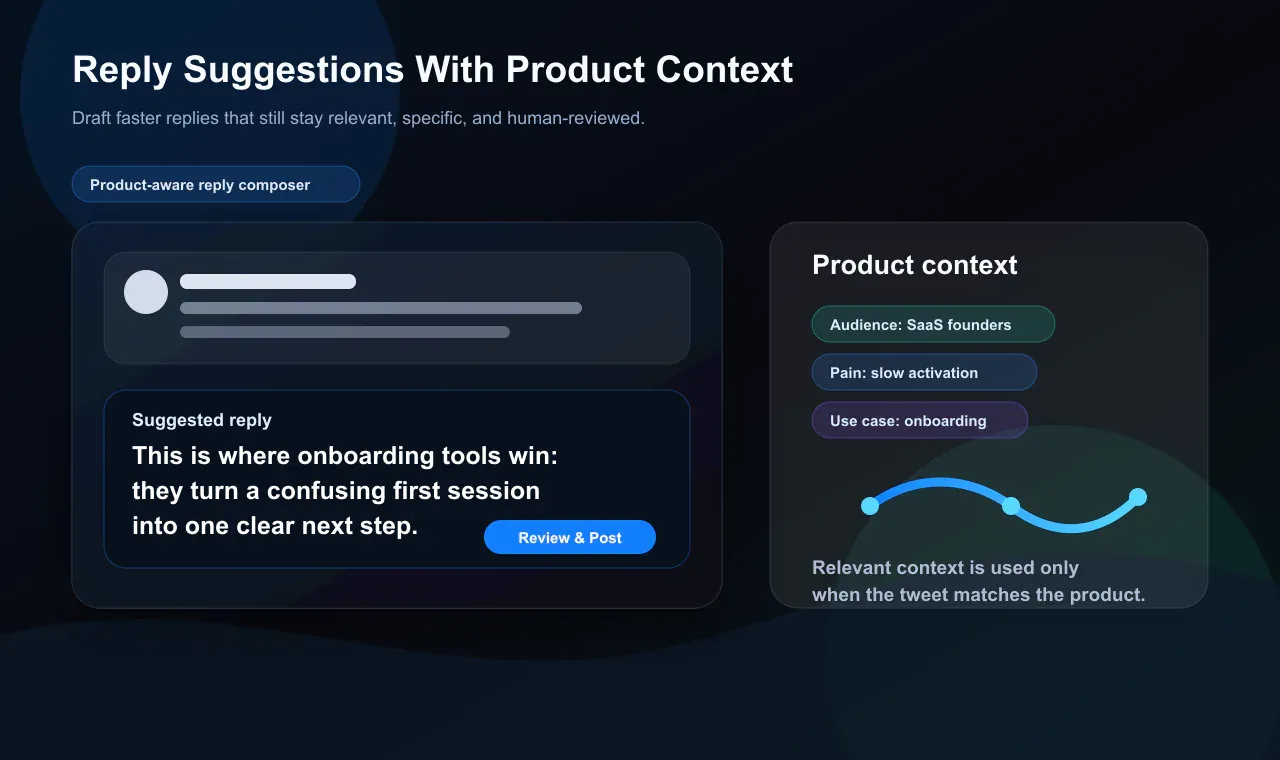
The goal is not to turn every reply into a sales pitch. The goal is to help you notice relevant openings and write something useful without sounding like a generic AI assistant.
Reply Deck: Find Better Conversations First
This is the feature many AI Twitter reply extensions skip.
Xholic’s Reply Deck surfaces high-momentum tweets from creators in your niche, including accounts you may not have discovered yet. That means you are not relying only on whatever your feed happens to show you.
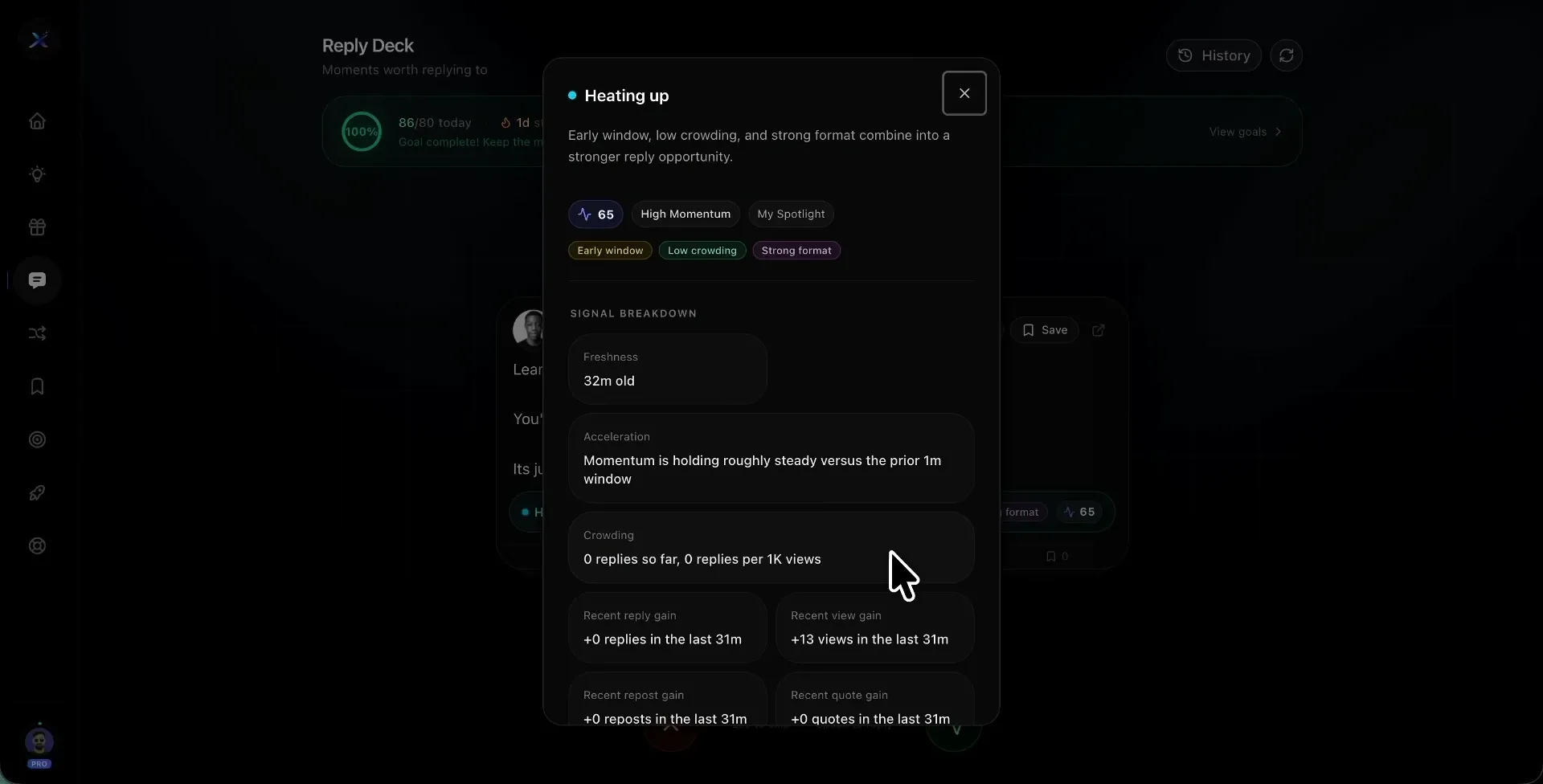
For growth, this matters as much as writing speed. A good reply under the wrong post disappears. A useful reply under the right post can introduce your profile to exactly the audience you want.
Tweet Remixer and Steal the Structure
Good X writing is not only about wording. It is also about format. High-performing posts usually have a hook, tension, pacing, and payoff.
Xholic’s Tweet Remixer helps adapt proven formats into your voice. Steal the Structure breaks down why a tweet worked and turns that pattern into a reusable template.
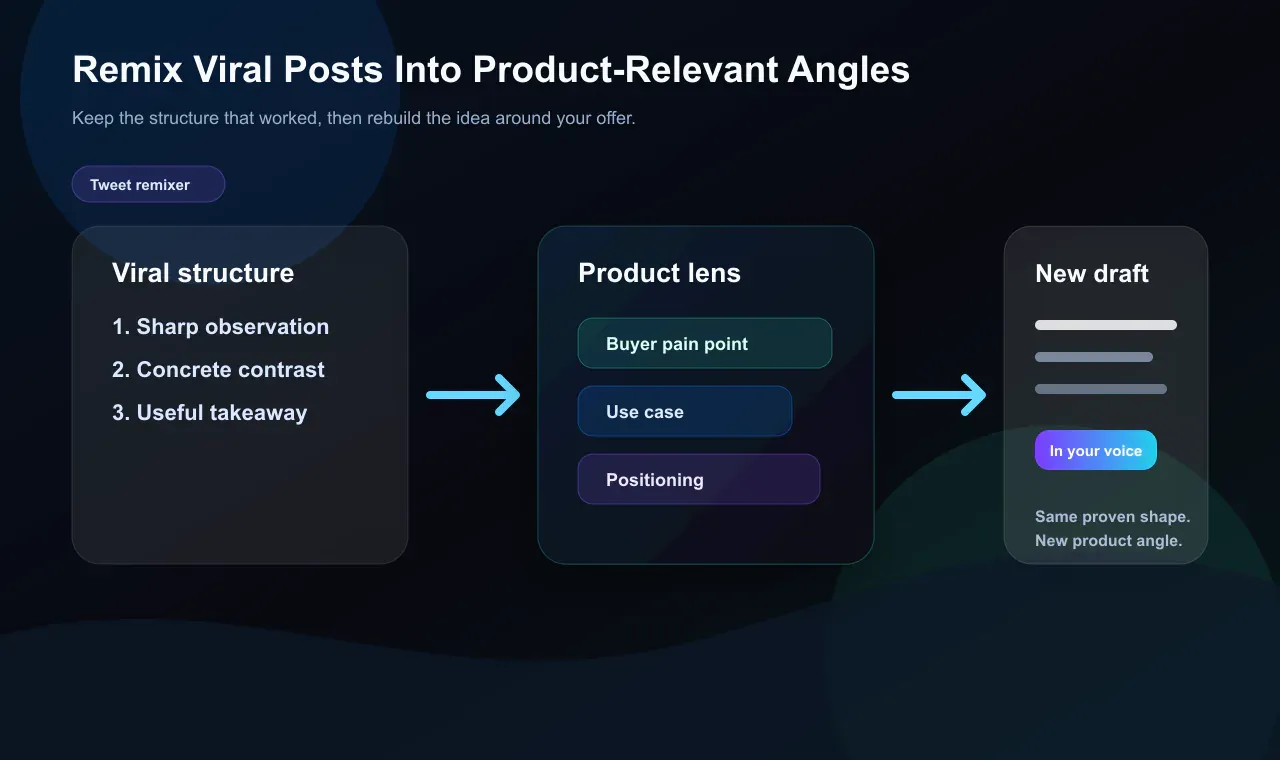
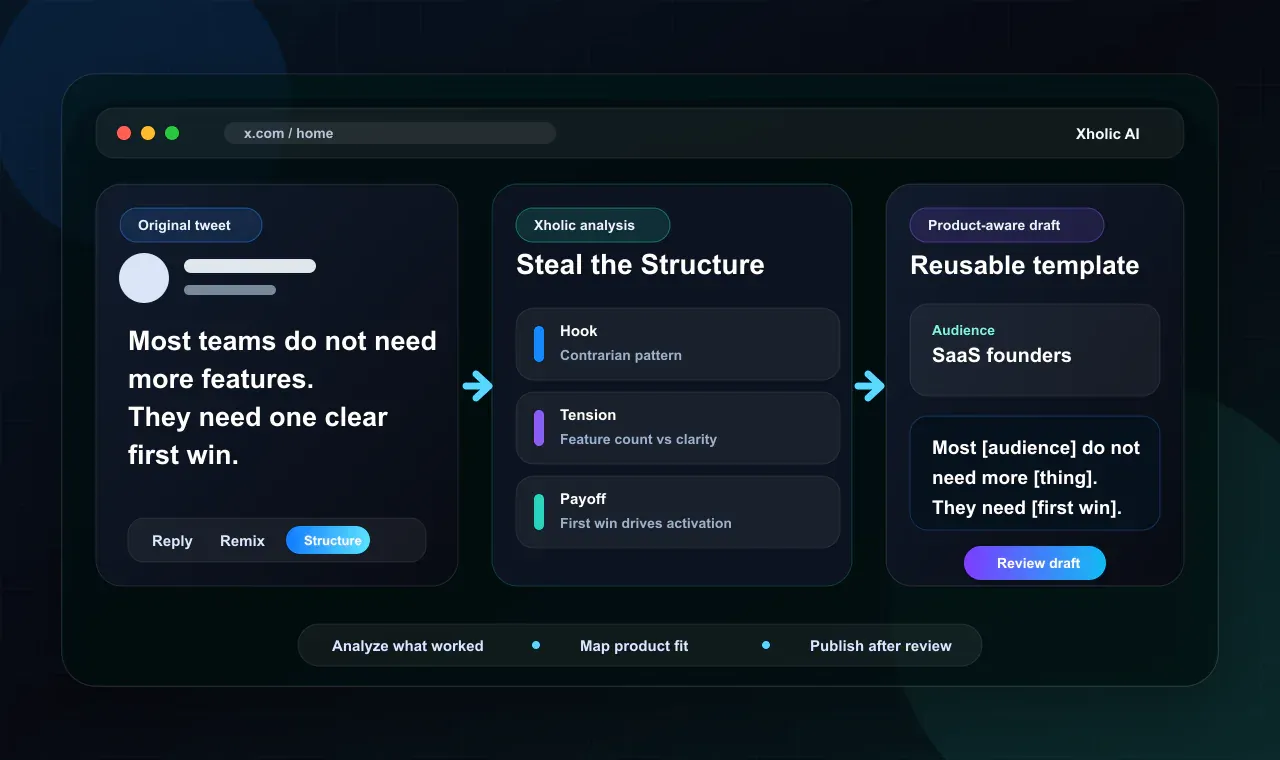
That gives you a path from “I saw something that worked” to “I understand the pattern and can use it responsibly with my own idea.”
Daily Pack, Saved Collections, Goals, and Streaks
Replying is one motion. Growth is a loop.
Daily Pack helps you start the day with post drafts. Saved Collections keeps useful tweets from disappearing into native bookmarks. Goals and Streaks create a visible habit loop so consistency is easier to maintain.
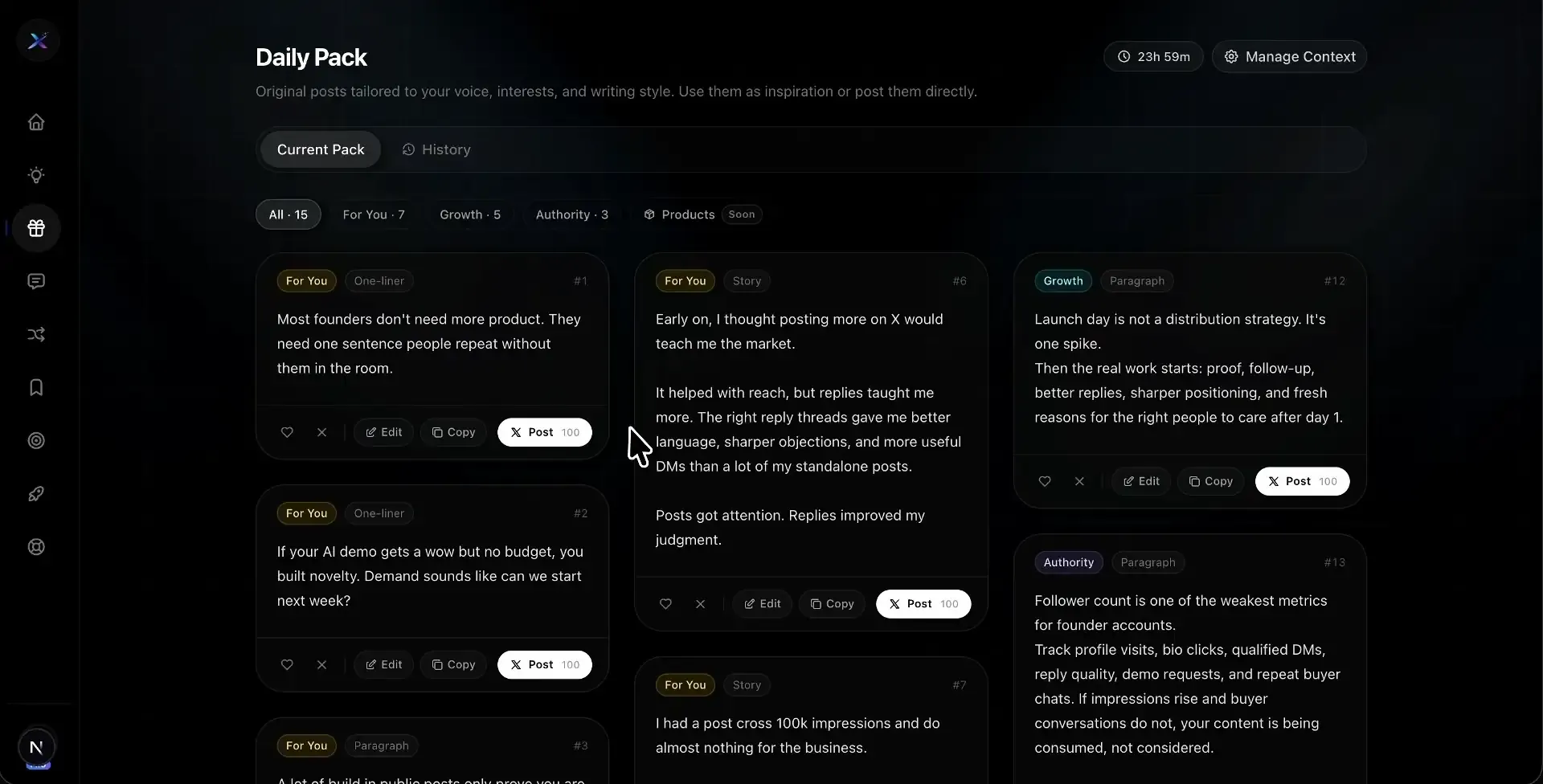

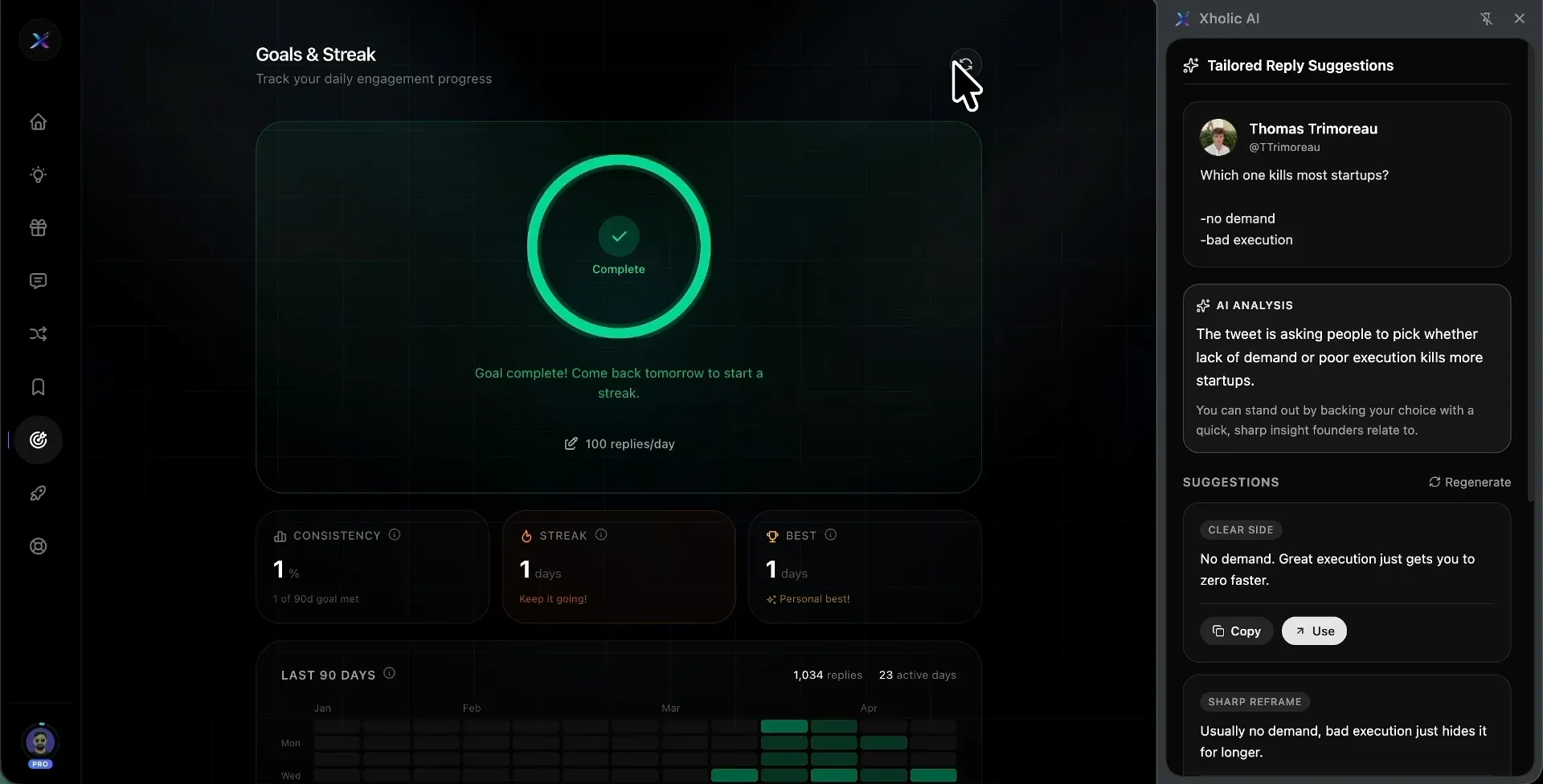
This is why Xholic fits a different category than a simple reply button. It helps with replies, but it also helps with what happens before and after the reply.
Who Should Use Xholic AI
Xholic is built for people who treat X as a real growth channel, not a place to occasionally drop a reply.
- Founders building in public who want product-aware replies without forcing a pitch.
- Creators replying daily who need faster drafts without losing their own voice.
- Indie hackers who want to find relevant conversations before competitors do.
- Operators who want discovery, drafting, research, remixing, and consistency in one workflow.
How to Install Xholic AI
Setup is straightforward:
- Open the Xholic AI Chrome Web Store listing.
- Add the extension to Chrome.
- Sign in with your Xholic account.
- Open X in your browser.
- Use the toolbar underneath tweets to reply, remix, save, or study structure.
- Review and edit every draft before posting.
You can also start from xholic.ai if you want to review the product, trial, and pricing details first.
Privacy and Permissions: What the Extension Needs to Work
Any browser extension that works inside X deserves scrutiny. You should understand what it can read, why it needs access, and what happens to the data.
Xholic’s privacy policy explains that the extension runs on x.com to provide reply suggestions, discovery, and collection management. It reads tweet content and metadata when you interact with a tweet, uses your logged-in username for account verification, stores an authentication token locally through Chrome storage, and sends selected interaction data to Xholic servers so the product can generate suggestions and operate reliably.
For AI features, tweet content you interact with may be processed by AI models to generate reply suggestions, content recommendations, or insights. Xholic states that AI-generated suggestions are provided for review and are never posted automatically.
The practical takeaway: this is not a zero-data extension, because contextual replies require context. Before installing any AI reply extension, read the permissions and privacy policy, then decide whether the workflow value is worth that access.
Where Xholic Is Not the Right Fit
Xholic is a strong fit if X is a serious growth channel for you. It is not the right tool for every case.
- If you only want occasional one-off replies, a smaller free reply extension may be enough.
- If you want a local-first bring-your-own-key setup, a tool like Yapzy may be a better match.
- If you need LinkedIn, Instagram, YouTube, Facebook, and X in one lightweight reply tool, a multi-platform extension may fit better.
- If you want unattended auto-posting or mass engagement, Xholic is intentionally not built for that.
- If you expect perfect voice matching on day one, reset that expectation. Voice-aware tools improve with usage and editing feedback.
- If you do not want to install a Chrome extension or create a Xholic account, the product will not fit your workflow.
That limitation list is intentional. Xholic is built for people who want a controlled, review-first X growth system, not a bot.
Frequently Asked Questions About AI Reply Extensions
What is the best Twitter reply generator or AI reply generator for X/Twitter in 2026?
The best AI reply generator depends on your goal. If you only need quick drafts, a lightweight reply extension may be enough. If you want a full X growth system with in-feed replies, product-aware suggestions, discovery, remixing, saved research, daily post drafts, and streak tracking, Xholic AI is one of the most complete options to evaluate.
Is an AI tweet generator the same as a Twitter reply generator?
Not exactly. An AI tweet generator usually helps you create original posts from ideas or prompts. A Twitter reply generator works from an existing tweet and needs to respect the conversation already happening. Xholic includes reply generation, but it also supports original post ideas, remixing, saved research, and daily content habits.
Does an AI reply extension auto-post for you?
Reputable tools should keep you in control. Xholic does not auto-post replies, remixes, or drafts. You review and approve before anything is published. You are still responsible for using the tool in a non-spammy way and following X’s rules and content policies.
Can AI replies actually sound like me?
They can get closer when the tool has useful context and you consistently edit the drafts. Do not expect perfect voice matching instantly. The best workflow is to treat AI replies as fast first drafts, then make small edits until they sound unmistakably like you.
Is it against X’s rules to use an AI reply tool?
The safer framing is this: Xholic is a writing and discovery assistant, not an auto-posting bot. It does not publish on your behalf or inflate engagement metrics. You still need to avoid spam, repetitive replies, impersonation, and any behavior that violates X’s policies.
How do I grow on X without spending hours on it every day?
Use a simple loop: find high-value conversations, write useful replies faster, save patterns worth reusing, turn proven structures into original posts, and keep a realistic daily habit. That is the workflow Xholic tries to put in one place.
Should I choose a reply-only tool or a full X growth tool?
Choose a reply-only tool if your bottleneck is only drafting. Choose a broader X growth tool if your bottlenecks include discovery, idea generation, research organization, content structure, and consistency.
Final Thought
The market for AI reply extensions is crowded, and it will get more crowded. The tools that matter are not the ones that generate the most replies. They are the ones that help you write replies that sound human, show up in better conversations, and support a profile that posts consistently.
That is a harder problem to solve. It is also the right problem.
Xholic AI is built around that broader loop. Whether it is right for you depends on how seriously you treat X as a growth channel and whether you want one system for replies, discovery, remixing, research, and consistency instead of several disconnected tools. It is not the right fit if you want unattended bots, mass engagement, or a tool that posts without review.
The Chrome extension is live, and the current Xholic site lists a 7-day free trial with no credit card required. Install it, test it on 10 real replies in your niche, then compare draft quality, editing time, and workflow speed against your normal process.