Going viral on Twitter/X is no longer about luck. In 2026, it’s about using the right systems, the right timing, and the right tools consistently. Whether you’re a solo creator, a brand, or a marketer trying to grow an audience from scratch, understanding how social media management tools fit into your growth strategy can be the difference between a post that gets 12 likes and one that earns 1.2 million impressions.
This guide covers everything, from how the X algorithm actually works, to which tools help you execute faster, to how you can turn one viral tweet into long-term follower growth.
What Does “Going Viral” Actually Mean on Twitter/X?
Before you chase virality, you need to understand what it means. Going viral on Twitter/X is not an absolute number, it’s relative to your account size and niche. A tweet with 50,000 impressions from an account with 800 followers is viral. A tweet with the same impressions from an account with 200,000 followers is not.
Virality on X means your post has dramatically exceeded your normal reach, more reposts, more replies, more profile visits, more new followers than your baseline. That’s the number you’re trying to beat.
The good news? Even small accounts go viral in 2026 when the content is right and the timing is right. But none of that happens consistently without a process, and that’s where social media management tools come in.
Why Social Media Management Tools Are Non-Negotiable in 2026
Let’s be honest about something most “grow on Twitter” articles skip over: manual management doesn’t scale.
Posting whenever you feel like it, checking analytics whenever you remember, replying to comments hours later, that approach works at 500 followers. It does not work when you’re trying to reach 50,000. The X algorithm in 2026 is time-sensitive. It rewards accounts that post consistently, engage quickly, and respond to trends in real time.
Social media management tools solve three problems that kill most creators’ growth:
1. Inconsistency — Missing posting windows because life gets in the way.
2. Slow engagement — Missing the critical first 30 to 90 minutes after posting when the algorithm decides if your tweet gets pushed further.
3. No data-backed decisions — Posting based on gut feelings instead of what your analytics actually show.
The right tools handle scheduling, analytics, engagement tracking, and content planning so your account stays active even when you’re not online.
Understanding the X Algorithm in 2026 (Before You Pick Any Tool)
Every tool is only as good as your understanding of what it’s optimizing for. Here’s how X’s algorithm works right now.

The Algorithm Prioritizes Conversation, Not Just Likes
X amplifies posts that generate replies and quote tweets, not just passive likes. A post with 40 replies can outperform a post with 200 likes in terms of distribution when those replies signal stronger conversation. This means your content strategy needs to invite responses. Ask questions, make bold claims, take a contrarian position, post data people want to debate.
The Verified Account Boost Is Real
X Premium includes documented reply prioritization across tiers. This doesn’t mean unverified accounts can’t go viral, they absolutely can, and it does not guarantee wider reach for every post, but Premium can affect visibility inside replies and active conversations.
The Viral Window Is Narrow — and There Are Two of Them
Many viral tweets show signs of traction early, often within the first 18 to 30 minutes of posting. But there is a second wave pattern that most people miss: if you can reignite engagement through replies, quote tweets, or a follow-up thread a few hours later, the algorithm may push your content into a second wave of distribution.
This timing knowledge changes how you use scheduling tools. You don’t just post and walk away. You post, engage hard for the first hour, and then monitor for a second wave opportunity.
Video Summary: Timing Your First Hour
The practical lesson from the video is simple: do not schedule your most important posts for moments when you cannot participate. If a post starts getting replies, the first hour should be active, not passive.
Use the timing window like this:
- Before posting: Make sure the hook is clear, the post is easy to reply to, and you have 30 to 60 minutes available.
- After posting: Reply to early comments quickly, ask follow-up questions, and keep the conversation moving.
- A few hours later: Check whether the post deserves a follow-up, quote tweet, or short thread that gives the algorithm another reason to resurface it.
Video Content Gets Extra Surface Area
In 2026, video posts deserve a place in your content mix because X gives video its own performance tracking and richer feed presentation. If you’re not using video, even simple, talking-head style clips, you’re working harder than you need to for the same reach.
The Role of AI Tweet Generator Tools in Viral Content Creation
One of the biggest shifts in Twitter growth over the past two years is that AI tools have become genuinely useful for content creation, not just as crutches, but as speed multipliers.
Tools like the ones available at Xholic.ai’s tools page help creators do something that used to take hours: generate ideas, draft tweets, and test angles quickly. Instead of staring at a blank screen trying to write a hook, you can use an AI tweet generator to produce 10 variations of an opening line and pick the sharpest one.
The key is not to treat AI output as a finished product. Use it as a first draft. Your voice, your perspective, your timing, those still have to come from you. The AI helps you get from zero to something faster.
If you want to understand how AI tweet generators work and how to use them without sounding robotic, Xholic.ai has a detailed breakdown on how to discover the best AI tweet generator for quick, creative replies.
How to Use Scheduling Tools to Win the Posting Timing Game
Timing is one of the most controllable variables in whether a tweet gains traction. Post when your audience is asleep and even great content goes to waste.
How to Find Your Best Posting Times
Start with your last 30 posts. Note the exact time you posted each one and compare it to the engagement numbers. Look for patterns. You’ll start to see windows, maybe your audience responds best to tweets published between 7:00 and 9:00 AM, or 12:00 to 1:00 PM, or 8:00 to 10:00 PM.
Most scheduling tools give you this data without manual work. Platforms like Buffer, Typefully, and Sprout Social analyze your historical performance and recommend optimal posting windows.
Building a Content Calendar That Doesn’t Burn You Out
Consistency is the single most underrated factor in Twitter growth. An account that posts 3 to 5 times per day, every day, with quality content will almost always outperform an account that posts 15 times for one week and then disappears.
A content calendar built inside a scheduling tool solves this. You batch-create content, maybe a few hours on Sunday, then schedule it across the week. Your account stays active, your audience grows accustomed to hearing from you, and the algorithm rewards the consistency.
The Xholic.ai blog on how to grow on X/Twitter in 2026 goes deeper on building systems like this.
Use Blank Tweet Templates to Speed Up Your Drafting Process
One of the most practical hacks experienced creators use is tweet templates. Instead of starting from scratch every time, they keep a library of proven formats, hooks they’ve seen work, thread openers that drive engagement, question formats that get replies.
Xholic.ai offers 10 blank Twitter post templates designed for 2026 that you can fill in with your own content. Templates are not lazy, they’re the same principle that professional copywriters use when writing high-converting ads.
Analytics Tools: Knowing What to Double Down On
Posting without tracking your analytics is like driving without a dashboard. You might be going somewhere, but you have no idea how fast or whether you’re about to run out of fuel.
What Twitter Analytics Actually Tells You
The core metrics to track on every post are impressions, engagement rate, profile clicks, and follower conversions. But the metric most people miss is what Xholic.ai calls the “impressions per follower” ratio. How broadly a tweet spread relative to your current audience size. This tells you which posts actually broke out of your existing follower bubble.
For a full breakdown of what these numbers mean and how to improve them, read the Xholic.ai guide on what impressions on Twitter really mean and how to boost engagement.
Free Twitter Analytics Tools Worth Using
You don’t need to spend a fortune on analytics, especially at the beginning. X’s native analytics give you a solid foundation. Several free third-party tools go deeper on hashtag performance, follower growth, and posting time optimization.
The Xholic.ai roundup of free Twitter analytics tools is one of the more complete lists available, comparing what each tool tracks and which ones are actually worth your time versus which ones just collect dust.
Setting Up a Twitter Analytics Dashboard
Serious creators and brands don’t just check analytics after individual posts, they monitor a live dashboard that shows trends over days and weeks. This is where patterns emerge: which topics are getting more engagement this month, whether your follower growth rate is accelerating or plateauing, how your engagement rate changes as your audience grows.
Xholic.ai has a dedicated guide to setting up a Twitter analytics dashboard that walks through both the free and paid options.
The Engagement Loop: Why Replying Fast Matters More Than You Think
Most creators treat posting as the main event. It’s actually just the opening act. What happens in the 60 to 90 minutes after you post is what determines whether the algorithm distributes your content to a wider audience.
Engaging With Replies in the First Hour
The moment you post, set a timer for 30 minutes. Stay near your phone or computer. Reply to every comment that comes in. Ask follow-up questions. Like responses. Pull out individual replies and expand on them.
This does two things. First, it signals to the algorithm that your post is generating real engagement, not just impressions. Second, it makes the people who replied feel seen, which increases the chance they repost your content to their own followers.
Using AI Reply Tools to Keep Up With Volume
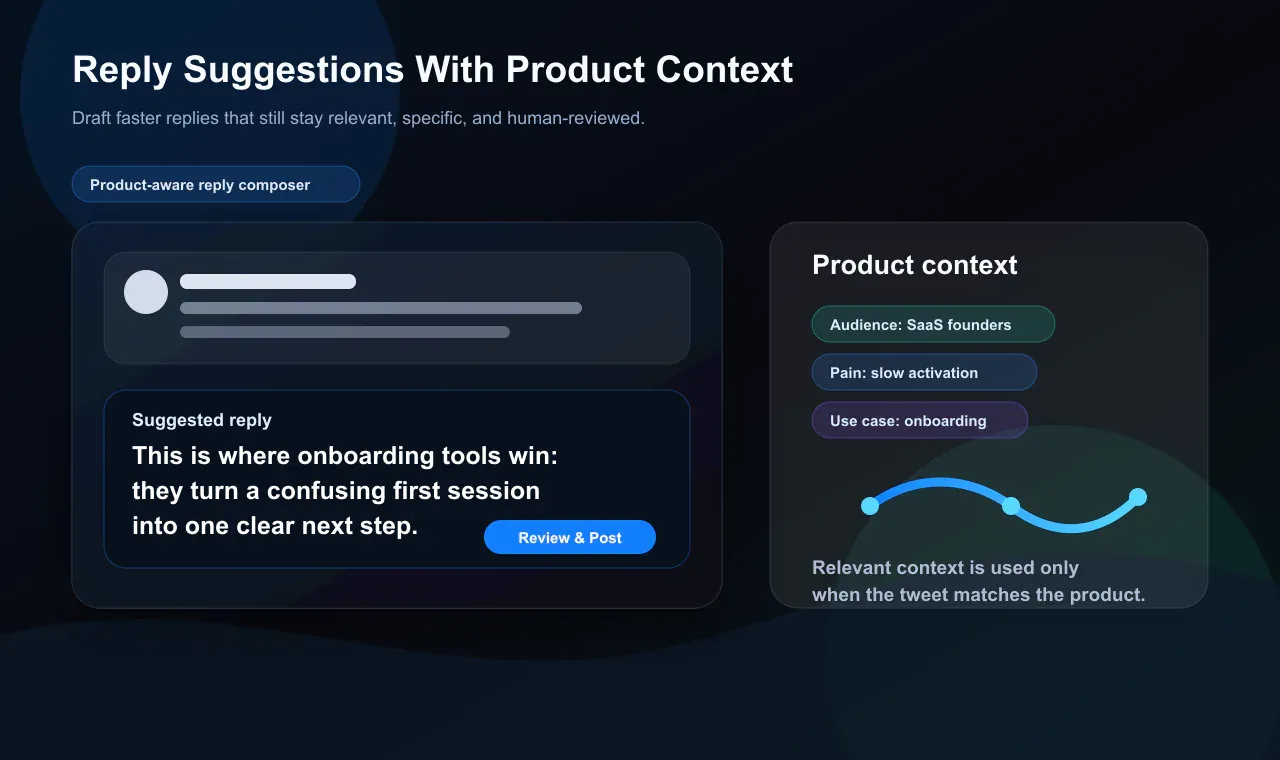
When a tweet starts gaining traction, keeping up with the replies can get overwhelming fast. This is where AI reply tools come in. They don’t replace your voice, they help you draft responses quickly so you’re not spending 20 minutes composing a thoughtful reply when you have 40 more comments waiting.
Xholic.ai’s AI Twitter reply extension is built specifically for this use case. It generates contextually appropriate replies that you can edit and send, keeping your engagement speed high without sacrificing quality.
For a broader look at how to generate fast, relevant replies at scale, the Xholic.ai guide on AI tweet reply tools covers the specific workflows that fast-growing accounts use.
A Practical Xholic Reply Workflow
Here is what a product-aware reply workflow looks like in practice:
| Step | What you do | Why it helps |
|---|---|---|
| Find active conversations | Look for posts in your niche that are still gaining replies and quote tweets | You join the discussion while attention is still moving |
| Draft with context | Use an AI reply tool to create a fast first draft based on the original post | You avoid generic replies and save time |
| Add your point of view | Edit the draft with a specific example, disagreement, question, or useful detail | The reply sounds like you, not a template |
| Save the best angles | Turn strong replies into future standalone posts or thread openers | Good replies become a content research loop |
| Review performance | Track which reply types bring profile visits, follows, or deeper conversations | You double down on replies that create real growth |
Content Strategy: What Types of Tweets Actually Go Viral
Tools can optimize your timing and speed up your workflow, but the content itself has to hit. Here’s what’s working in 2026.
Three Tweet Patterns Worth Testing
Use these patterns as starting points, not scripts. The goal is to make each post easier to scan, easier to reply to, and easier to remember.
| Pattern | Example structure | Best use case | What to measure |
|---|---|---|---|
| Contrarian observation | ”Most people think X causes Y. The real problem is Z.” | Point-of-view posts, founder lessons, industry commentary | Replies, quote tweets, profile visits |
| Specific proof post | ”I reviewed 30 posts in [niche]. The top 5 all had this in common.” | Analytics, experiments, case studies, teardown content | Bookmarks, reposts, follower conversion |
| Relatable truth | ”The hardest part of [goal] is not [obvious problem]. It is [hidden problem].” | Creator lessons, pain-point posts, audience-building | Likes, replies, reposts from similar accounts |
Threads Outperform Single Tweets for Sustainable Virality
A single viral tweet gets attention. A thread holds it. Threads get bookmarked and shared at significantly higher rates than standalone tweets, and each individual tweet inside the thread is an additional engagement opportunity.
The format that works most reliably: a hook tweet that creates strong curiosity or debate, followed by a thread that actually delivers on the promise. The first tweet earns the impressions. The thread earns the follows.
For inspiration and real-world examples, the Xholic.ai post on 10 tweet examples that actually work in 2026 is worth reading before you draft your next thread.
Contrarian Takes and Bold Opinions Drive Distribution
The tweets that get quote tweeted, and quote tweets are one of the strongest signals for X’s algorithm, are typically the ones that make people feel strongly. Agreement is fine. Constructive disagreement is even better.
This doesn’t mean being inflammatory. It means having a clear point of view. “Here’s why everyone is wrong about [popular opinion]” performs better than “Here are some thoughts on [topic].” The contrast creates engagement.
Relatable Observations and Humor
Tweets that make people nod and think “someone finally said this” travel fast. Relatable content gets shared because people use it to signal something about themselves to their own audience. If your tweet says what someone else’s followers are already feeling, those followers repost it.
Data and Original Research
Original numbers stop scrollers. “I analyzed 847 tweets and found these 5 patterns” is more compelling than “here are some tips.” If you have access to data, even small-scale data from your own tests, share it with specifics.
The Fake Tweet Generator: A Misunderstood Content Tool
One tool that consistently gets misunderstood is the fake tweet generator. It’s not for creating misleading content or impersonating real people. Its legitimate use cases are valuable: visualizing how a tweet concept will look before posting, creating educational content, A/B testing different copy formats, and producing mock-ups for tutorials or case studies.
Xholic.ai’s fake tweet generator lets you create realistic X/Twitter mockups without the risk of publishing anything prematurely. The guide on using a fake tweet maker responsibly covers the ethical framework for using these tools properly, something more creators and educators need to understand.
Building a Twitter Presence That Converts Viral Moments Into Lasting Growth
One of the biggest mistakes creators make is treating virality as the goal. It’s not. Virality is the mechanism. Growth is the goal.
When a tweet goes viral, you get a surge of profile visitors. Most of them will make a snap decision in the first 3 seconds: stay or leave. That decision is made based on your bio, your pinned tweet, and your recent posts. If those things aren’t in order, you lose the conversion.
Optimize Your Profile Before You Chase Virality
Your Twitter bio needs to answer one question immediately: “Why should I follow this person?” It should communicate who you help, what you talk about, and, ideally give a concrete signal of credibility. Xholic.ai’s guide on proven Twitter biography ideas for 2026 includes real examples of bios that convert casual visitors into followers.
Your profile photo should be clear and recognizable at small size. Your header image should reinforce your niche or offer. Your pinned tweet should either be your most engaging content or a clear introduction to what you do.
Cross-Promote Viral Content on Other Platforms
When something takes off on X, don’t leave the momentum on one platform. Take the thread or tweet and repurpose it as a LinkedIn post, an Instagram carousel, a short video, or a blog post. The content has already been validated, now distribute it everywhere.
The Xholic.ai guide on social media content suggestions includes specific ideas for how to adapt Twitter content across platforms without it feeling copy-pasted.
Consistency Compounds Over Time
Viral moments are spikes. Consistent posting is the baseline that those spikes grow from. An account that never posts can’t go viral. An account that posts consistently, even if no individual post blows up, gradually accumulates followers, credibility, and the kind of engagement history that makes future virality more likely.
Tools like Typefully, Buffer, and Xholic.ai’s Chrome extension for X growth make consistency possible without consuming your entire day.
The Twitter Follower Growth System That Actually Works
Going viral once is an event. Building a system is a career. Here’s the framework that sustainable Twitter accounts use.
Step 1: Define Your Content Pillars
Pick 3 to 5 topics you’ll post about consistently. Your audience should be able to predict, broadly, what kind of content they’ll get from you. Random accounts that post about everything get ignored. Focused accounts that clearly serve a specific kind of person grow.
For ideas on how to structure this, the Xholic.ai guide on how to get followers on Twitter breaks down the content pillar approach in practical terms.
Step 2: Build a Posting Rhythm Using Management Tools
Use a scheduling tool to publish at least 3 times per day, one educational post, one opinion or conversation starter, one reply or engagement post. This rhythm keeps you in the feed without requiring you to be online all day.
The Xholic.ai playbook on how to gain new followers on Twitter in 2026 includes a day-by-day structure for building this habit.
Step 3: Engage With Others Before Posting Your Own Content
Spend 15 to 20 minutes each morning leaving meaningful replies on tweets from larger accounts in your niche. Not “great post!”, actual thoughts that add to the conversation. This exposes your name to the followers of bigger accounts and brings warm traffic to your profile.
This is one of the strategies covered in detail in the Xholic.ai post on how to build Twitter followers.
Step 4: Track Your Follower Count and Engagement Rate Weekly
Mastering your Twitter follower count isn’t just about watching numbers go up. It’s about understanding the relationship between your content quality, your posting frequency, and your growth rate. When your follower growth slows down, your analytics will tell you why, usually it’s a drop in engagement rate, a shift in content type, or inconsistent posting.
A 30-Minute Daily X Growth Workflow
If you only have half an hour a day, do not split it randomly. Use one tight workflow that covers discovery, creation, engagement, and review.
| Time | Action | Tool category |
|---|---|---|
| 0-5 minutes | Check trending conversations, saved inspiration, and yesterday’s best-performing posts | Trend monitoring and analytics |
| 5-10 minutes | Choose one angle for an original post or thread | AI ideation and saved examples |
| 10-18 minutes | Draft one post and one alternate hook, then schedule or publish it | AI tweet generator and scheduler |
| 18-27 minutes | Leave thoughtful replies on 5 to 8 high-fit posts in your niche | AI reply assistant and X search |
| 27-30 minutes | Note one signal: best reply, best topic, best hook, or best posting window | Analytics dashboard |
This workflow matters because it gives every tool a job. Scheduling keeps you consistent, analytics tells you what to repeat, AI helps you draft faster, and manual judgment keeps the account from sounding automated.
Top Social Media Management Tools for Going Viral on Twitter/X
Here’s a practical look at the tools that serious X creators and brands are using in 2026:
For Scheduling and Calendar Management:
- Typefully — Purpose-built for Twitter threads, with real-time analytics and AI assistance. Best for solo creators who live on X.
- Buffer — Clean, simple scheduling with good analytics. Works well for creators managing multiple platforms.
- Sprout Social — Enterprise-grade scheduling with ViralPost technology that identifies optimal posting windows. Best for teams and agencies.
For Analytics and Performance Tracking:
- X Native Analytics — Free and underrated. Gives you impressions, engagement rate, link clicks, and profile visits per post.
- Keyhole — AI-powered predictive analytics that forecasts campaign performance before you launch. Best for campaign-heavy brands.
- Fedica (formerly Fedica) — Strong on audience sentiment analysis and follower mapping.
For Content Creation and AI Assistance:
- Xholic.ai Tools — A growing suite of X-specific tools including a fake tweet generator, quote tweet generator, reply chain generator, block screen generator, and account suspension screen generator. These tools help creators visualize, plan, and produce content faster.
- Tweet Hunter — AI tweet generation with access to a library of top-performing viral tweets for inspiration.
For Trend Monitoring:
- Trendsmap — Real-time Twitter trending topics broken down by location.
- Google Trends — Cross-reference trending topics on Twitter with search volume to find topics with multi-platform momentum.
Best Tool Stack by Use Case
The right stack depends on your bottleneck. A solo creator needs speed and focus. A marketing team needs approvals, reporting, and consistency across more channels.
| Use case | Best-fit tool category | Strong picks | Main limitation | Pair it with |
|---|---|---|---|---|
| Solo creator posting daily | X-first drafting and scheduling | Xholic.ai, Typefully | Can still become repetitive without personal edits | Weekly analytics review |
| Founder building authority | AI replies plus trend discovery | Xholic.ai, X Search, Google Trends | Requires a clear niche and point of view | Pinned profile offer |
| Multi-platform marketer | Cross-platform scheduler | Buffer, Sprout Social | X-specific reply workflows may be thinner | Native X analytics |
| Analytics-heavy account | Dashboard and campaign tracking | X Native Analytics, Fedica, Keyhole | Data is retrospective unless paired with discovery | Saved content experiments |
| Team or agency workflow | Calendar, approval, reporting | Sprout Social, Buffer | More setup and cost than a solo creator needs | Brand-safe reply guidelines |
For a detailed comparison of the top analytics tools specifically for Twitter, the Xholic.ai guide to Twitter analysis tools breaks down which tools are worth paying for and which free options are strong enough for most creators.
Safe Automation: When Tools Help and When They Hurt
Automation is one of the most misunderstood areas of Twitter growth. Used correctly, automation tools save hours of repetitive work. Used incorrectly, they get your account flagged or suspended.
What’s appropriate to automate:
- Scheduling tweets and threads
- Posting evergreen content from a content library
- Setting up alerts for brand mentions and keywords
- Reviewing new followers and saving high-fit accounts for manual follow-up
What will hurt you:
- Mass auto-following and unfollowing
- Automated replies that sound robotic or off-topic
- Cross-posting identical content from other platforms without editing
- Engagement pods that trigger artificial reply chains
The safest rule: automate reminders, scheduling, research organization, and reporting. Keep follows, replies, and relationship-building under human control.
Advanced Tactics: How to Increase Twitter Engagement in 2026
Once you have the basics working, consistent posting, solid analytics, good content, these advanced moves accelerate your results.
Use Polls to Generate Easy Engagement
Polls get replies from people who would never normally interact with your content. They’re low-friction, a single click, and they generate a comment thread when people debate the options. Even simple polls (“Which do you prefer: A or B?”) pull in engagement that boosts your post’s distribution.
Pin a Tweet That Sells the Follow
Your pinned tweet is the first thing a new profile visitor will read after your bio. It should make a clear case for why someone should hit the follow button. A thread that showcases your best thinking, a post that explains exactly who you help and how, or your most impressive piece of content — these all work as pinned tweets.
Leverage Quote Tweets Strategically
Quote tweeting a larger account’s post with a genuinely interesting addition or perspective puts your name in front of their followers. If your addition is good enough, some of their followers will check your profile. Do this thoughtfully, add real value, don’t just try to piggyback.
Use the Right Hashtags (2 Maximum)
Hashtag strategy on X in 2026 is not about cramming in as many as possible. Use 1 to 2 highly relevant hashtags per tweet. More than that looks spammy and actually reduces reach. For trending hashtags, only use them if your content is genuinely relevant to the trend, forced hashtag use is obvious and hurts credibility.
For the full breakdown of engagement tactics, the Xholic.ai guide on how to increase Twitter engagement in 2026 is one of the most complete resources available.
Content Ideation Tools: Never Running Out of Ideas
One of the most common reasons creators go inconsistent is that they run out of ideas. Social media management is part tool, part process, and the process of generating content ideas consistently is something tools can actually help with.
Tools for Finding Trending Topics
Following your niche’s trending conversations on X and engaging early, before a topic peaks, is one of the most reliable ways to get distribution. Tools like Trendsmap, X’s own Explore tab, and social listening platforms help you identify these conversations early.
AI-Powered Content Ideation
AI content ideation tools analyze what’s performing well in your niche and suggest angles, formats, and topics you might not have considered. The Xholic.ai roundup of the 10 best content ideation tools for 2026 covers both the general-purpose tools and the Twitter-specific options.
Repurposing Your Best Performing Content
One idea executed 10 different ways is more valuable than 10 random ideas. Look at your top 5 performing tweets from the past 3 months. What made them work, the format, the topic, the angle? Now recreate that pattern with new content. This is what top creators mean when they say “double down on what works.”
The Twitter Font and Visual Branding: Why It Matters More Than You Think
Visual consistency is part of brand building on Twitter. Your header image, profile photo, and any graphics you share in tweets should feel cohesive. When someone scrolls past 20 tweets and yours looks different, in a good way, they stop.
Understanding something as specific as Twitter’s font (Chirp) and how it affects readability is the kind of detail that separates creators who think casually about their presence from those who think strategically. Even the way you format your tweets, line breaks, spacing, whether you use emojis and how you use them, contributes to whether people actually read your content or scroll past it.
Xholic.ai also has a useful guide on emoji meanings on X that helps you understand how different emojis land with different audiences — relevant if you’re trying to be precise about tone.
What to Do After a Tweet Goes Viral
Most creators have no plan for when something takes off. That’s a missed opportunity. Here’s the playbook for turning a viral moment into permanent growth.
In the first 2 hours: Engage with every reply. Pin the viral tweet to your profile. Post a follow-up tweet that builds on the topic.
In the first 24 hours: Thank the accounts that quote tweeted you. Convert the content into a thread if it wasn’t one already. Share it on other platforms.
In the first week: Analyze why it went viral. What was the hook? What topic? What format? Then plan your next 5 posts to test whether you can replicate the pattern.
In the first month: Use the new followers you gained as a signal. Look at who followed you and what they’re interested in. Adjust your content mix accordingly.
Frequently Asked Questions About Social Media Management Tools for Twitter/X
What is the best social media management tool for Twitter/X growth?
There is no single best tool for every account. If your main bottleneck is writing and replying faster, use an X-specific AI workflow like Xholic.ai. If your main bottleneck is scheduling across several platforms, Buffer or Sprout Social may fit better. If your main bottleneck is thread writing, Typefully is a strong option.
Can social media management tools make a tweet go viral?
No tool can guarantee virality. Tools improve the parts you can control: timing, consistency, drafting speed, reply speed, analytics, and trend monitoring. The post still needs a strong hook, a clear point of view, and enough relevance for people to reply, repost, or quote tweet it.
How often should you post on Twitter/X in 2026?
For most creators, 2 to 5 posts per day is a practical range if quality stays high. A better baseline is one strong original post, one lighter post or repurposed idea, and a focused reply block. Posting more helps only when the account still sounds useful, specific, and human.
Are AI tweet generators safe to use?
Yes, if you use them as drafting tools instead of publishing raw output. The safest workflow is to generate options, choose the strongest angle, edit for your own voice, and remove anything generic or unsupported. AI should speed up judgment, not replace it.
Should you automate replies, follows, or engagement?
Be careful. Scheduling posts and organizing research are low-risk uses of automation. Automated follows, mass unfollows, generic replies, and engagement pods create brand and platform risk. Keep judgment-heavy actions manual.
Final Thoughts: Tools Are Leverage, Not a Shortcut
Social media management tools don’t make you go viral. Your content, your perspective, your consistency, and your engagement do that. What tools do is remove the friction that prevents most creators from showing up every day.
They give you back the hours you’d otherwise spend manually scheduling content. They show you the data you need to stop guessing and start optimizing. They help you move faster, writing tweets, drafting replies, generating ideas, without sacrificing quality.
The creators who are growing fastest on Twitter/X in 2026 aren’t working harder than everyone else. They’re using better systems. They’re combining high-quality content with the right tools, the right analytics habits, and a consistent engagement process.
Start with the fundamentals: understand the algorithm, build a content calendar, track your analytics, and engage fast. Then layer in the tools that help you do each of those things at scale.
If you’re looking for a one-stop suite of X-specific tools built for creators and marketers who take their growth seriously, explore everything available at Xholic.ai’s tools hub and dig into the Xholic.ai blog for strategies that go deeper on every topic covered in this guide.