Quick answer: Enter your followers, impressions, likes, replies, reposts, and quotes, or scan a public X handle, and the tool calculates your engagement rate instantly with an A/B/C/D grade benchmarked against accounts of a similar size. No login required.
What Is It?
The Twitter Engagement Rate Calculator works two ways. You can enter your own analytics numbers manually for the most accurate result, or scan any public X handle to get an estimate based on recent original posts. Either way, you get a clear engagement rate percentage and a letter grade from A through D showing how that rate compares to similar-sized accounts.
Open the Twitter Engagement Rate Calculator Tool.
Who Uses It and Why
| Who Uses It | What They Use It For |
|---|---|
| Creators checking their own performance | Get a quick, clear read on whether their engagement rate is actually good, not just a raw number with no context |
| Brands vetting influencers before a deal | Scan a creator’s public handle to verify their engagement matches their follower count before agreeing to a sponsorship |
| Agencies reporting to clients | Generate a clean, benchmarked engagement number for client reports without needing the client’s login |
| Anyone comparing accounts in their niche | Scan a few accounts to see how their own engagement stacks up against others at a similar follower level |
How to Use It - Step by Step
There are two paths: manual entry or a public profile scan. Pick whichever fits your situation.
Path A: Manual Calculator
Use the manual calculator when you have access to your own X analytics. This is the most accurate path because it uses your real impression data.
Step 1: Open the tool
Go to Twitter Engagement Rate Calculator in your browser.
Step 2: Enter your numbers
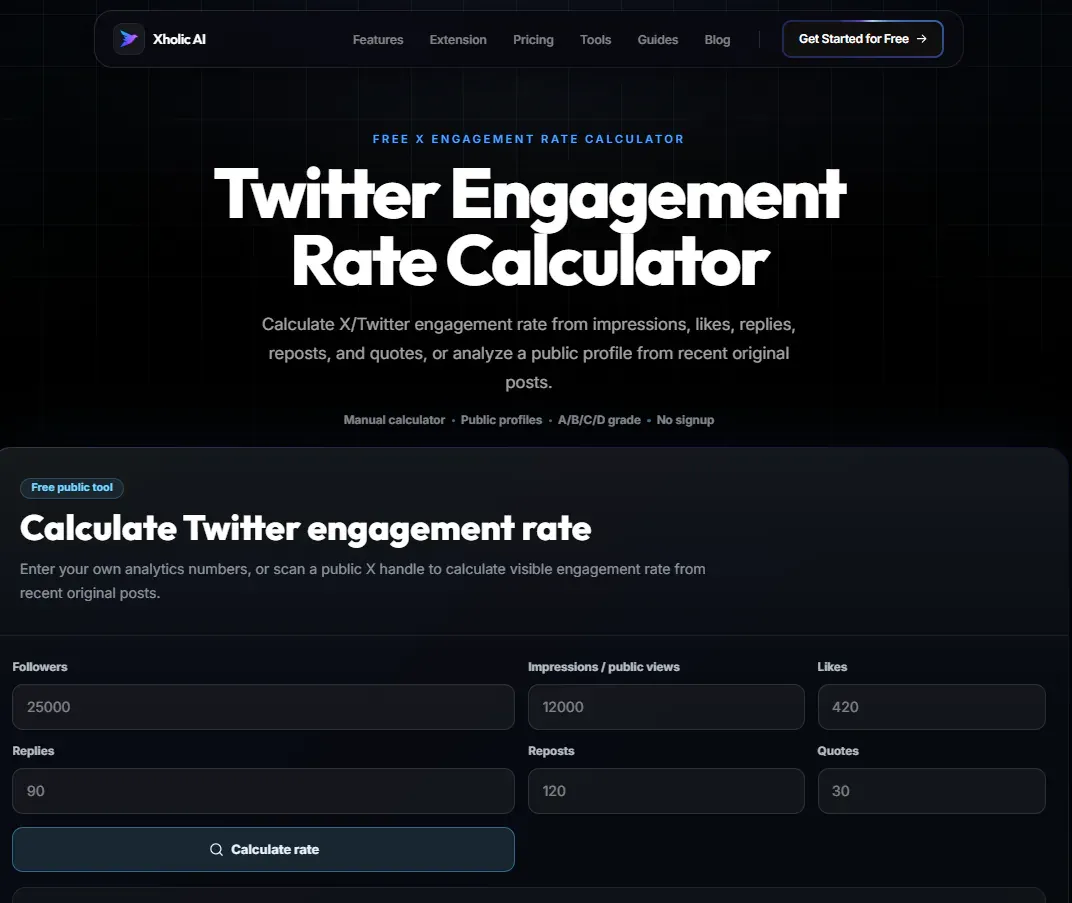
Fill in your follower count, impressions or public views, likes, replies, reposts, and quotes pulled from your own X analytics dashboard.
Step 3: Click Calculate Rate
The tool runs the numbers and returns your engagement rate as a percentage.
Step 4: Read your grade
You’ll see an A/B/C/D grade showing how your rate compares to accounts in a similar follower range.
Path B: Scan a Public Profile
Use the profile scan when you want the fastest estimate for a public account, including accounts you do not own.
Step 1: Open the tool
Use the same calculator page, then choose the profile scan option instead of manual entry.
Step 2: Enter an X handle
Type any public @handle, either your own or someone else’s.
Step 3: Click Scan Profile
The tool reads recent original posts and uses public views as a proxy for impressions, since private analytics data is not accessible publicly.
Step 4: Review the estimate
You’ll get an estimated engagement rate and grade. This is slightly less precise than the manual method because it relies on public view counts rather than private impression data, but it is instant and requires nothing from the account owner.
Pro tip: If you have access to your own X analytics, use the manual calculator with your real impression data for the most accurate result. Save the profile scan for checking other accounts, like a potential sponsorship partner, where you do not have access to their private numbers.
How Engagement Rate Is Actually Calculated
The standard manual formula is:
Engagement Rate = ((Likes + Replies + Reposts + Quotes) / Impressions) x 100
This is the formula the calculator uses for manual entries. For profile scans, public view counts substitute for impressions because impression data is private and only visible to the account owner inside their own X analytics.
Key insight: Engagement rate benchmarks vary significantly by follower count. Smaller, niche accounts often post higher engagement rates than large accounts. That is not a flaw in your content; it is a structural pattern across the platform. The A/B/C/D grade accounts for this by comparing you to similar-sized accounts, not the platform average.
Real Example
A creator with 12,000 followers checks their last tweet: 8,400 impressions, 210 likes, 18 replies, 12 reposts, and 4 quotes.
Plugging this into the manual calculator:
(210 + 18 + 12 + 4) / 8,400 x 100 = 2.9% engagement rate
The tool grades this a B+ for their follower tier: solid, with room to push toward A-grade territory by improving reply rate specifically.
Good to Know
Heads up: Profile scans use public view counts as a proxy for impressions because private analytics data, including true impressions, profile visits, and link clicks, is only visible to the account owner inside X’s own analytics dashboard. This means a profile scan result is a solid estimate, not an exact figure. For your own account, the manual calculator with real data is always more accurate.
Frequently Asked Questions
What is a good Twitter/X engagement rate?
It depends heavily on your follower count. Smaller accounts under 10k followers often see 2-5% as a strong rate. Larger accounts with 100k+ followers frequently see lower percentages even with great content, simply because impressions scale faster than active engagement. The tool’s A/B/C/D grade accounts for this by comparing you to accounts in a similar follower range rather than a flat industry average.
Why does the profile scan give a different number than my own X analytics?
The profile scan uses public view counts as a stand-in for impressions, since impression data is private. Your own X analytics dashboard has access to your real impression numbers, which is why the manual calculator using your real data will always be more precise than a public scan.
Do I need to log into X to use this?
No. Both the manual calculator and the profile scanner work without any X login or account connection. For the manual calculator, you’ll need to look up your own numbers from your X analytics dashboard first.
Can I check someone else’s engagement rate?
Yes, that is exactly what the profile scan is for. Enter any public handle to get an estimated engagement rate and grade, useful for vetting influencers or researching competitors.
What’s included in the engagement count?
Likes, replies, reposts, and quotes. This is the standard set of engagement actions used in most engagement rate formulas across the industry.
How is the A/B/C/D grade determined?
The grade compares your calculated engagement rate against typical benchmarks for accounts in a similar follower range, giving you context for whether your rate is strong, average, or below where similar accounts tend to land.
Related Xholic Tools
These tools work well alongside this one:
- X Profile Analytics - See the full content mix and cadence behind your engagement numbers
- Twitter Analytics Guide - The complete guide to reading every metric in your analytics dashboard
- X Profile Audit - Score your full profile, not just your engagement rate
- Twitter Account Worth Calculator - Engagement rate is a key input behind your estimated account value