Quick answer: Browse a library of structured bio frameworks organized by positioning angle, founder, creator, freelancer, job seeker, and more. Each template shows the exact structure with placeholder text you can swap for your own details.
What Is It?
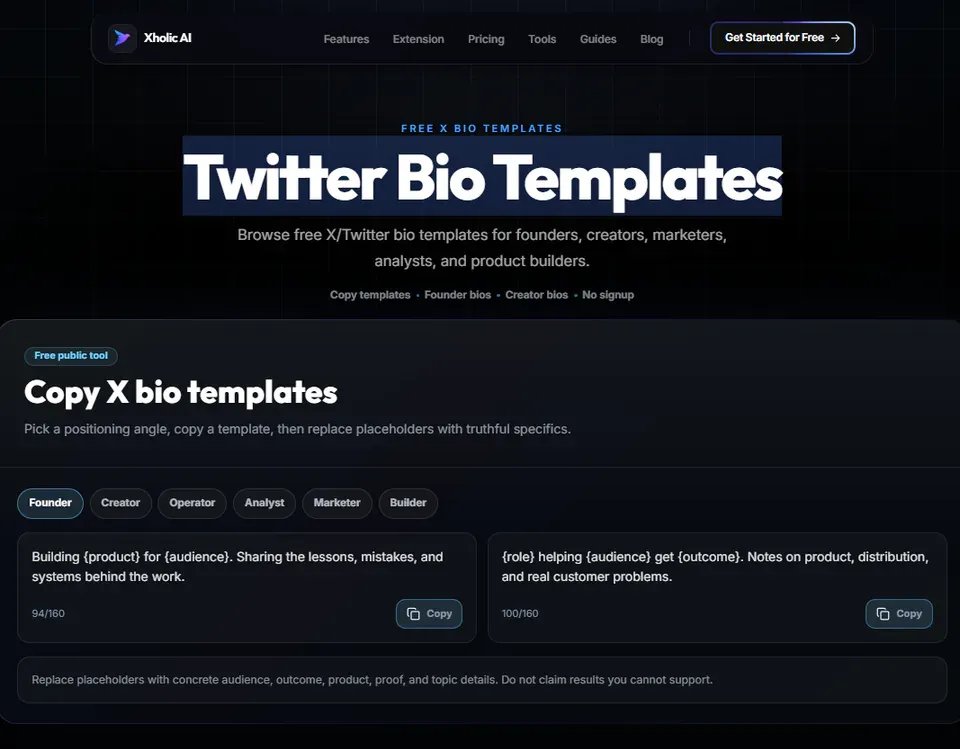
Twitter Bio Templates is a free tool at xholic.ai. Browse a library of structured bio frameworks organized by positioning angle, founder, creator, freelancer, job seeker, and more. Each template shows the exact structure with placeholder text you can swap for your own details.
Open the Twitter Bio Templates Tool.
Who Uses It and Why
| Who Uses It | What They Use It For |
|---|---|
| First-time Twitter users | Want a proven structure rather than starting from a blank field |
| People repositioning their account | Need a new bio angle that matches a career or niche change |
| Founders & operators | Want a bio template specific to building and sharing a company journey |
| Freelancers & consultants | Need a template that signals expertise and availability clearly |
How to Use It - Step by Step
It takes under a minute. Here’s exactly what to do:
Step 1: Open the tool
Go to Twitter Bio Templates Tool in your browser.
Step 2: Browse by archetype
Filter templates by account type founder, creator, freelancer, job seeker, niche expert, or brand.
Step 3: Read the structure
Each template shows the bio broken into labeled parts (who you are, what you do, proof, hook) with placeholder text.
Step 4: Copy the template
Click Copy to grab the template structure, including the placeholders.
Step 5: Replace the placeholders
Swap in your real role, your real numbers, and your real call to action. Never paste a template with someone else’s specific details still in it.
Pro tip: Don’t copy a template with the placeholder numbers or company names left in. Always replace every bracketed detail with your own. A bio with leftover placeholder text like ‘[X years]’ looks unfinished, not just unedited.
Real Example
A freelance writer browses the freelancer template category and finds: ‘[Role] helping [audience] with [specific outcome]. [Years] experience. [Proof point]. [CTA link]’. They fill it in as: ‘Copywriter helping SaaS founders write landing pages that convert. 5 years experience. Wrote for 40+ startups. Portfolio link’. Clean, specific, ready to use.
Good to Know
Heads up: Templates are structures, not finished copy. The accounts that convert well from a bio combine the template structure with genuinely specific, real details, a real number, a real outcome, a real niche. A template filled in vaguely performs no better than no template at all.
Frequently Asked Questions
Are these templates unique to my account?
The structures are reusable frameworks, many people may use the same structure. What makes your bio unique is the specific details you fill in. Always personalize fully.
Which template should I use?
Pick the archetype closest to your actual role. If you’re a founder building a product, use the founder template. If you create content for an audience, use the creator template.
Can I combine elements from different templates?
Yes. The templates are starting points, mix the proof-point style from one with the hook style from another if that fits you better.
Do the templates fit within 160 characters?
Yes, all templates are designed to fit comfortably within Twitter’s 160-character bio limit, even after you add your specific details. Double-check with the Character Counter after personalizing.
How is this different from the Bio Generator?
The Bio Generator creates custom bio options based on your specific inputs. Bio Templates gives you proven structures to fill in yourself. Use templates if you want full control over the wording; use the generator if you want AI to draft options for you.
Related Xholic Tools
These tools work well alongside this one:
- Twitter Bio Generator - Generate custom bio options instead of filling in a template
- Twitter Bio Guide - The complete guide to writing a bio that converts
- Twitter Character Counter - Confirm your filled-in template stays under 160 characters
- Twitter Font Generator - Style key words in your finished bio